
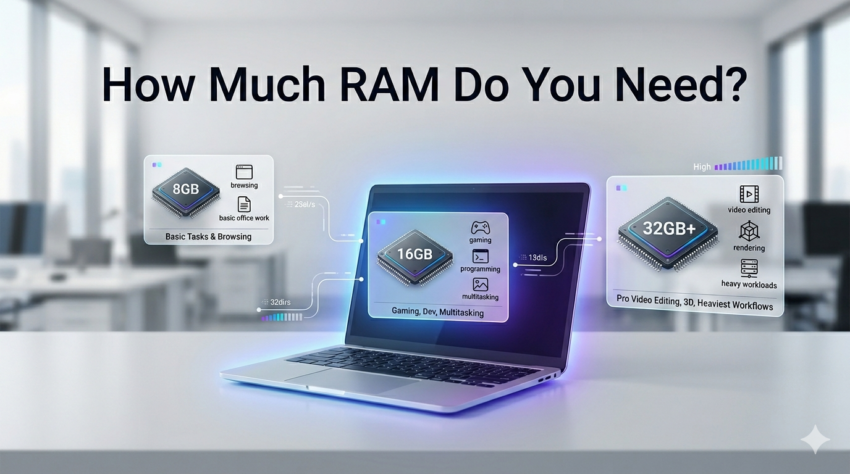
Here’s a situation most people have been in: you’re comparing two laptops that look almost identical, same price range, same brand but one has 8GB of RAM and the other has 16GB. The 16GB one costs a bit more. Is it worth it? Do you even need it?
RAM is one of those specs that sounds technical but has a very direct, everyday impact on how your laptop feels to use. Get it right and your machine stays quick and responsive for years. Get it wrong and you’re watching that spinning loading icon more often than you’d like.
This guide cuts through the confusion and gives you a clear answer based on how you actually use a laptop.
What Is RAM, in Plain English?
RAM stands for Random Access Memory. Think of it like your laptop’s short-term workspace — the surface area it uses to handle everything you have open right now.
Your storage drive holds all your files permanently. RAM holds the stuff your laptop is actively working with — open tabs, running apps, the document you’re editing. The more RAM you have, the more your laptop can juggle at once without slowing down.
When RAM runs out, your laptop starts borrowing from the much slower storage drive to compensate. That’s when things start to lag.
How Much RAM Do You Actually Need? It Depends on This.
There’s no single right answer but there is a right answer for you, based on what you do every day.
Basic Use: Browsing, Emails, and Documents
If your day involves checking emails, writing in Word or Google Docs, video calls, and general browsing you’re a light user.
8GB is perfectly fine for this. It handles everyday tasks without breaking a sweat, and most mid-range laptops in 2026 ship with 8GB as standard for exactly this reason.
That said, if you tend to keep 15+ browser tabs open alongside a few apps, 8GB can start to feel tight. It won’t break, but you might notice occasional slowdowns.
Students
Student needs vary more than people realise. A humanities student writing essays and managing PDFs has very different needs from a computer science student running code, virtual machines, or design software.
For most students, 8GB works but 16GB is the smarter buy. Here’s why: laptops bought for university often need to last four or five years, and software only gets heavier over time. Spending a little more upfront for 16GB means you won’t be fighting your laptop in your final year when deadlines are piling up.
If you’re studying a field that involves design, architecture, data analysis, or engineering software, go straight to 16GB minimum.
Choosing enough RAM is only one part of creating a productive study setup. Students using AI-powered applications for research, coding assistance, note-taking, and content creation should also know which software offers the best value. Our guide to the Best AI Tools for Students highlights the most practical AI platforms for everyday academic work.
Programming and Development
This one surprises people. Programming itself isn’t always RAM-heavy, but the tools around it are.
Running a local development server, keeping a code editor open, managing a browser for testing, and occasionally spinning up a virtual machine that all adds up quickly. 16GB is the practical minimum for developers in 2026. If you work with containers, run multiple environments simultaneously, or do anything with machine learning, 32GB will serve you better.
Gaming
Gaming RAM needs depend heavily on the games you play, but as a general rule the industry has moved on from 8GB.
Modern titles like open-world games and high-fidelity shooters regularly use 12–16GB on their own. Pair that with your OS and background processes and 16GB is now the baseline for a decent gaming experience. Serious gamers who also stream or record their gameplay should look at 32GB.
Video Editing and Creative Work
This is where RAM genuinely earns its keep. Video editing software like Premiere Pro or DaVinci Resolve is hungry for memory, especially when working with 4K footage, multiple audio tracks, or colour grading.
16GB is the entry point for video editing, and even that can feel limiting with complex timelines. If you’re doing this professionally or working with high-resolution footage regularly, 32GB is the right call. 3D rendering, motion graphics, and photography with large RAW files all fall into the same bracket.
8GB vs 16GB vs 32GB: When Does Each Make Sense?
| RAM | Best For |
| 8GB | Email, documents, light browsing, casual use |
| 16GB | Students, developers, light gaming, multitaskers |
| 32GB | Video editors, heavy gaming, power users, future-proofing |
If you’re genuinely torn between 8GB and 16GB, almost always go with 16GB. The price difference on most laptops is modest, but the difference in day-to-day smoothness especially a few years down the line is significant.
Future-Proofing: Why RAM That Feels Fine Today May Not Be Enough Tomorrow
Software keeps getting heavier. Operating systems use more resources with each update. Apps grow in complexity. A laptop that feels snappy on 8GB in 2026 may start struggling by 2028 or 2029 as everything around it evolves.
If you’re buying a laptop you want to use for four or five years, which most people do, buying the RAM you need today isn’t enough. You need to think about what you’ll be doing two or three years from now.
This is especially true for students and professionals. Buying 16GB now is almost always cheaper than dealing with a sluggish machine halfway through a laptop’s lifespan.
Upgradeable vs. Soldered RAM: A Critical Thing to Check
Here’s something many buyers overlook entirely: on a large number of modern laptops, especially slim and budget models, the RAM is soldered directly onto the motherboard. That means it cannot be upgraded. Ever. What you buy is what you’re stuck with.
On laptops where RAM is upgradeable (usually older or business-oriented models), you can buy a cheaper base configuration and add RAM later. But with soldered RAM which is increasingly common you only get one shot.
How to check: Look up the specific model you’re considering and search for whether its RAM is soldered or upgradeable. This information is usually available in tech reviews or the manufacturer’s spec sheet.
If the RAM is soldered, buy the higher option at purchase. If it’s upgradeable, you have a little more flexibility.
Reviews-4U covers this kind of detail in their laptop breakdowns worth checking before you commit to a specific model.
Common Mistakes People Make When Choosing RAM
Going for storage instead of RAM. A “1TB laptop” sounds more impressive than “16GB RAM” to most people, but RAM has a much bigger impact on everyday speed. Don’t trade one for the other.
Assuming 8GB is always enough because it was fine before. Expectations and software requirements have shifted. What worked in 2020 doesn’t always cut it in 2026.
Not checking if RAM is upgradeable. Buying 8GB soldered RAM to save money, planning to upgrade later and then finding out you can’t is a frustrating and avoidable mistake.
Buying way more than you need. 32GB is overkill for someone who writes documents and watches YouTube. Spending money on RAM you’ll never use takes the budget away from other specs that would actually matter more, like a better display or a longer battery.
Not sure where to start with your laptop search? It helps to first understand the broader picture — check out our guide on common laptop buying mistakes to make sure RAM is the only thing you're getting right.
Quick Recommendation Summary
| Who You Are | RAM You Need |
| Casual user (email, browsing, docs) | 8GB |
| Student (general use) | 8–16GB (lean towards 16GB) |
| Student (design, engineering, data) | 16GB |
| Developer / programmer | 16GB minimum |
| Gamer (casual to mid-level) | 16GB |
| Streamer or competitive gamer | 32GB |
| Video editor / creative professional | 32GB |
| Heavy multitasker / power user | 32GB |
Understanding how much RAM you need is only one part of the buying decision. Choosing a laptop with the right processor, SSD, battery life, and overall value matters just as much. If you’re shopping on a practical budget, our guide to the Best Laptops for Entrepreneurs Under ₹50,000 highlights business-ready laptops that strike the right balance between performance and affordability.
Final Thoughts
RAM isn’t glamorous, but it’s one of the most honest specs on a laptop. It doesn’t lie. More RAM genuinely means a smoother, faster, longer-lasting machine for most people.
For the majority of buyers in 2026, 16GB is the sweet spot enough for today’s tasks and comfortable headroom for what’s coming. 8GB still works for genuinely light users, and 32GB is worth it if your work demands it.
Before you finalise any purchase, check whether the RAM is upgradeable on the model you’re considering, and make sure the amount you’re buying matches not just what you do today but what you’ll likely need in two or three years.
Still comparing specific laptops? Reviews-4U has hands-on breakdowns of popular models across every budget, so you can see exactly how each one performs in real-world conditions before you buy.

Harry S is a digital marketing expert with 19+ years of experience. He created Reviews-4u.com to share simple, research-backed product insights that help users make better buying decisions.