
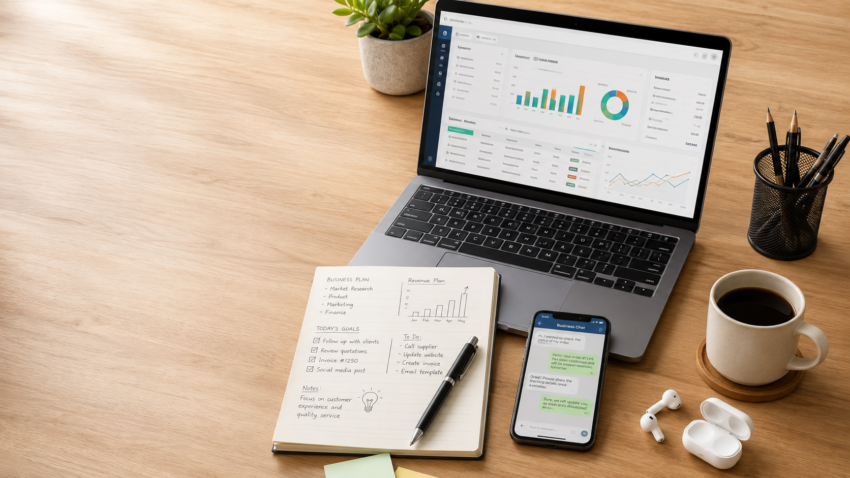
Most mornings for an entrepreneur look the same, regardless of what the business actually sells. An invoice needs to go out before the client forgets. A Zoom call with a supplier starts at 10. Google Workspace has three tabs open — one for the shared budget sheet, one for a client’s brief, one for email. Canva is running a social post in the background. WhatsApp Business is pinging with a customer question. Somewhere in another tab, ChatGPT is helping draft a proposal, and the CRM needs an update before the day ends.
None of this needs a gaming GPU. None of it needs a 240Hz display. What it needs is a laptop that starts fast, survives a full day without hunting for a charger, sounds and looks professional on a client call, and doesn’t slow down when fifteen tabs are open at once.
That’s the real difference between buying a laptop for entrepreneurship and buying one for gaming or casual browsing. A student laptop is judged on exam season and YouTube. A gaming laptop is judged on frame rates. A business laptop under ₹50,000 has to be judged on something less exciting but more important: can it carry a full working day of invoicing, calls, spreadsheets, and client-facing communication without becoming the reason a deal gets delayed?
This guide has been rebuilt for 2026 pricing and hardware, with every recommendation checked against how it behaves under an actual entrepreneur’s workload — not just a spec sheet. Prices, generations, and RAM configurations in the sub-₹50,000 laptop segment shift every few months, so treat the exact figures below as a starting point and confirm current pricing before you buy.
Which Entrepreneur Are You?
Not every business owner needs the same laptop. Before comparing models, it helps to know which features actually matter for your specific work.
- Startup Founder — You’re switching between investor decks, hiring emails, product specs, and finance sheets in the same hour. Multitasking headroom (16GB RAM) and a keyboard you can type on for hours matter more than raw speed.
- Freelancer — Your laptop is your business. Portability, a webcam that looks professional on client calls, and a battery that survives a work-from-café day are non-negotiable.
- Consultant — You’re presenting to clients often, sometimes on their premises. Prioritize a crisp display, fast Wi-Fi 6 support, and a design that looks presentable in a boardroom.
- Digital Marketer — Canva, multiple ad-platform dashboards, and browser tabs stacked ten deep. 16GB RAM and a smooth trackpad for creative tools matter more than storage size.
- Retail Business Owner — Billing software, inventory sheets, and supplier calls. Reliability and a strong local service network matter more than premium design.
- Content Creator — Photo editing, occasional short-form video, and cloud uploads. Look for a sharper display and slightly faster storage; a dedicated GPU isn’t necessary at this budget.
- Sales Professional — Constant travel, constant calls. Weight under 1.7kg and battery life above 8 hours should be the deciding factors.
- Remote Worker — Video calls all day, every day. Webcam quality, dual microphones, and a comfortable keyboard for long typing sessions matter most.
What Makes a Great Laptop for Entrepreneurs?
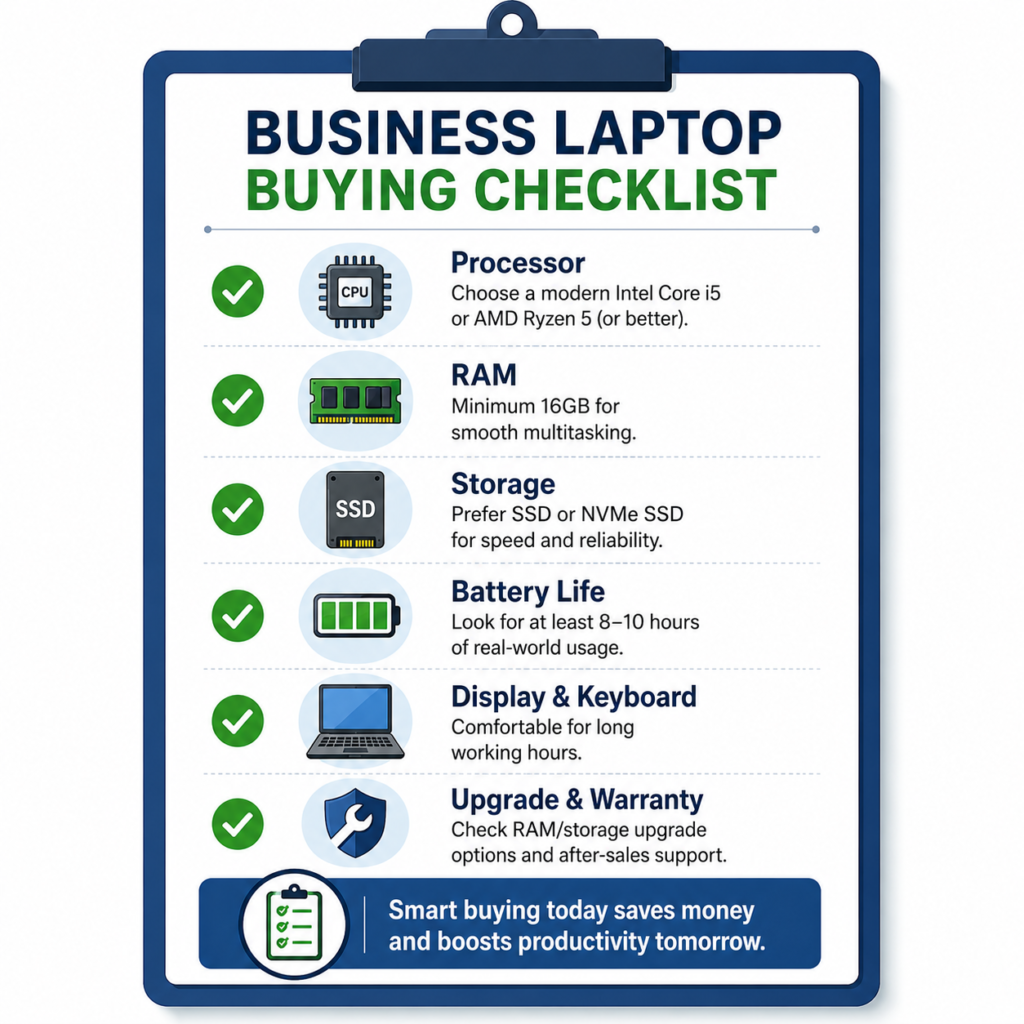
Specs sell laptops. Daily use decides whether that purchase was smart. Here’s what actually separates a good business laptop from a mediocre one at this price:
- Battery life — Real-world battery (with Wi-Fi, Zoom, and a browser running) is usually 25-35% lower than the marketed number. Judge laptops on realistic use, not the box.
- Keyboard comfort — You’ll type thousands of words a day. Shallow, mushy keys cause fatigue faster than people expect.
- Build quality — A flexing chassis or a wobbly hinge becomes a problem within a year of daily commuting.
- Portability — Anything under 1.7kg is comfortable for daily carry; above 2kg, you’ll feel it on long days.
- Display quality — An anti-glare, Full HD panel matters more than a higher resolution you can’t use outdoors.
- Webcam quality — Most budget laptops still ship 720p webcams. If client calls matter to your business, factor in a webcam check before you buy.
- Microphone quality — Dual-array or noise-cancelling mics are the difference between sounding professional and sounding like you’re in a call center.
- Reliability — Ask about failure rates and known issues for a specific model, not just the brand’s general reputation.
- Warranty — 1-year is standard; onsite warranty (a technician visits you) is a meaningful upgrade for business use.
- Service network — A brand with strong coverage in your city (or the nearest one) matters more than a brand with a better logo.
- Upgradeability — A free SO-DIMM RAM slot or a spare M.2 SSD slot can extend a laptop’s useful life by two to three years.
- Security — Windows Hello fingerprint or IR camera login, plus TPM 2.0 support, matters if you handle client data or online banking.
- AI features — Genuinely useful at this budget for running AI-assisted apps smoothly, not for running AI models locally on the device — more on this below.
Which Processor Should You Buy?
Under ₹50,000, you’ll mostly be choosing between four processor families. Here’s what each one actually feels like in daily use, not on a benchmark chart.
- Intel Core i3 (13th Gen) — Fine for basic browsing, email, and Word/Excel. Struggles once you stack 20+ Chrome tabs alongside Zoom. Best for very light, single-app-at-a-time use.
- Intel Core i5 (13th Gen, e.g. i5-1334U/1335U) — The sweet spot for entrepreneurs. Handles Chrome with dozens of tabs, Zoom, Excel, and Canva running together without visible slowdown.
- AMD Ryzen 3 (7000-series) — Comparable to Core i3 for everyday multitasking; a reasonable choice if the specific model has 16GB RAM and the i5 alternative doesn’t.
- AMD Ryzen 5 (7000-series, e.g. 7520U/7535U) — Matches or slightly beats the Core i5 in multi-tab, multi-app scenarios, and usually comes with better integrated graphics for Canva-style creative work.
- Intel Core Ultra / Core 5 series — Occasionally appears near this budget in older-generation or entry configurations. Worth considering if the price is close, since it adds a dedicated AI processing unit — but don’t pay a premium for it at this budget unless the rest of the spec sheet (RAM, SSD) is equally strong.
The practical rule: for entrepreneurs, Core i5 or Ryzen 5 should be the baseline unless the budget genuinely won’t stretch. The jump from i3/Ryzen 3 to i5/Ryzen 5 is more noticeable in daily multitasking than the jump from i5 to a more expensive chip.
How Much RAM Do Entrepreneurs Need?
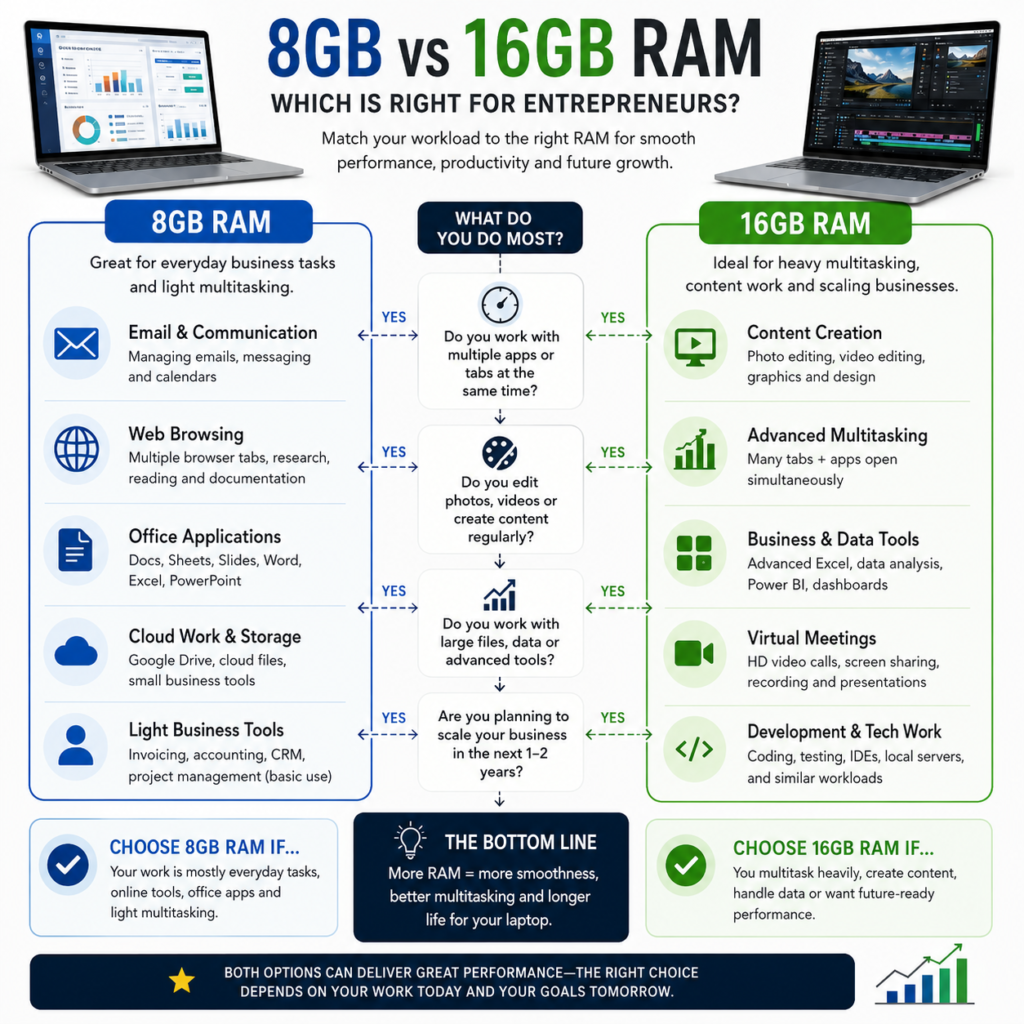
Eight gigabytes is still common at this price point, and it will run Windows 11 and one or two apps without complaint. The moment you add Zoom, ten Chrome tabs, Excel, Canva, and WhatsApp Desktop running simultaneously — which is a completely normal Tuesday for most entrepreneurs — 8GB starts to show its limits through stutter and slower app-switching.
Sixteen gigabytes has become the realistic minimum for business use in 2026, and the good news is that most of the laptops recommended below now ship with 16GB as standard rather than as a paid upgrade. If you’re choosing between two otherwise similar laptops, and one offers a free RAM slot for future upgrades while the other has RAM soldered to the board, take the upgradeable one — it adds years of useful life to the same purchase.
For a deeper breakdown of exactly how RAM affects multitasking and when 8GB genuinely isn’t enough, our detailed guide — How Much RAM Do You Really Need in a Laptop in 2026? — walks through real scenarios with side-by-side comparisons.
SSD Storage Recommendations
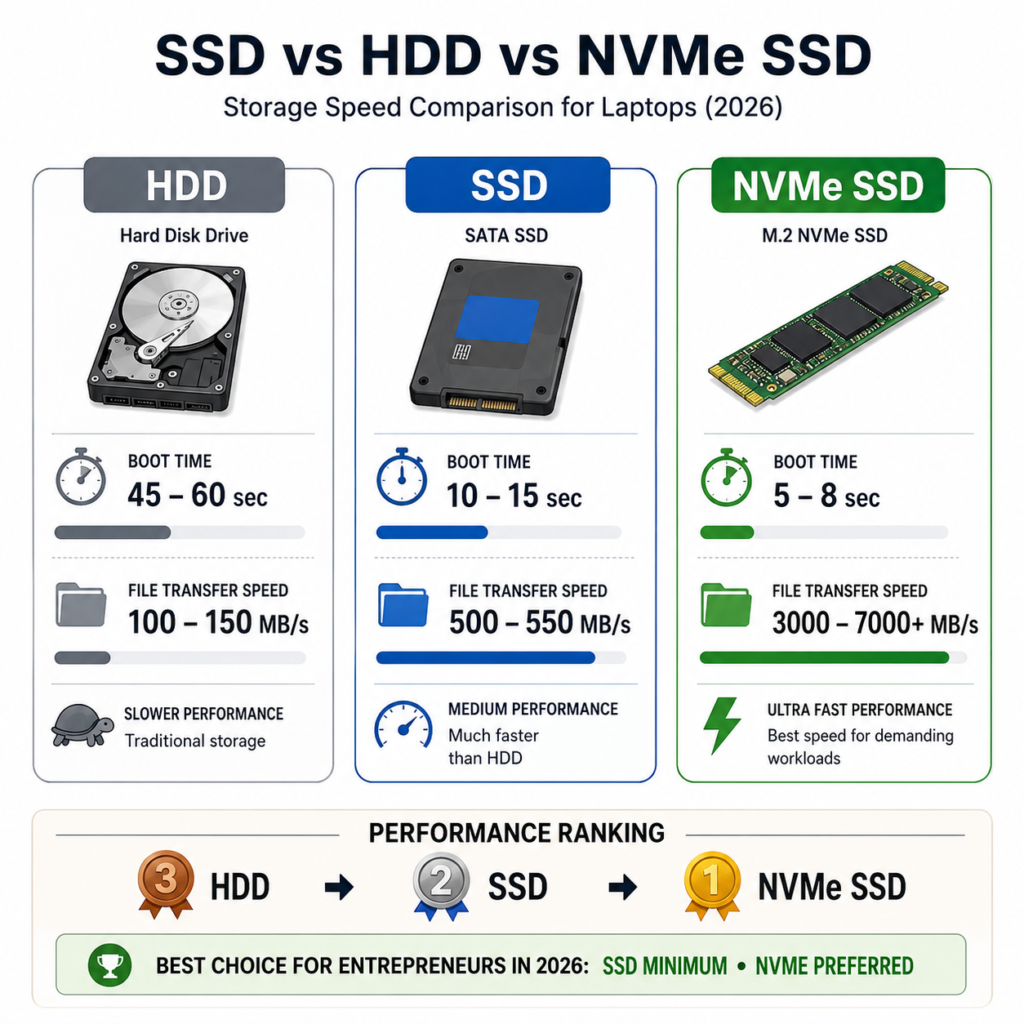
A hard disk drive (HDD) has no place in a 2026 business laptop — thankfully, almost none of the laptops in this price bracket still ship with one. The real decision is between SSD sizes:
- 256GB — Workable only if you rely almost entirely on cloud storage (Google Drive, Dropbox) for client files and don’t install many desktop apps. Gets tight fast once Windows updates and a few business tools are installed.
- 512GB — The right default for most entrepreneurs. Enough room for your OS, business software, invoicing tools, and a reasonable local backup of client files.
- 1TB — Worth paying for if you shoot product photos or videos for your own business, keep large design files locally, or simply prefer not to think about storage again for years.
The type of SSD matters as much as the size. NVMe SSDs are meaningfully faster than older SATA SSDs for everyday tasks like opening large Excel files or switching between apps — most 2026 laptops in this budget now use NVMe as standard, but it’s worth confirming before you buy. Our full comparison — SSD vs HDD vs NVMe: Why Your Laptop Still Feels Slow in 2026 — explains why storage type affects everyday speed more than most buyers expect.
Can These Laptops Handle AI Tools?
Every laptop in this guide can run browser-based and cloud-based AI tools comfortably — ChatGPT, Gemini, Microsoft Copilot, Notion AI, Grammarly, Perplexity, and Canva’s AI features all run through your browser or a lightweight app, so they depend far more on your internet connection and RAM than on specialized AI hardware. With 16GB RAM, none of these tools will slow down your laptop noticeably, even running alongside your usual business apps.
What these laptops generally cannot do is run AI models locally, on-device, at meaningful speed — the kind of task that dedicated “Copilot+ PC” and NPU-equipped laptops are built for. For most entrepreneurs, this distinction doesn’t matter: invoicing, drafting emails with AI assistance, and generating social content with Canva AI are all cloud-based tasks. If your business genuinely depends on offline or on-device AI processing, it’s worth reading our dedicated breakdown — Best AI Laptops in India (2026): Are Copilot+ PCs Worth Buying? — before deciding whether that’s a feature worth paying extra for.
The 5 Best Laptops for Entrepreneurs Under ₹50,000 in 2026
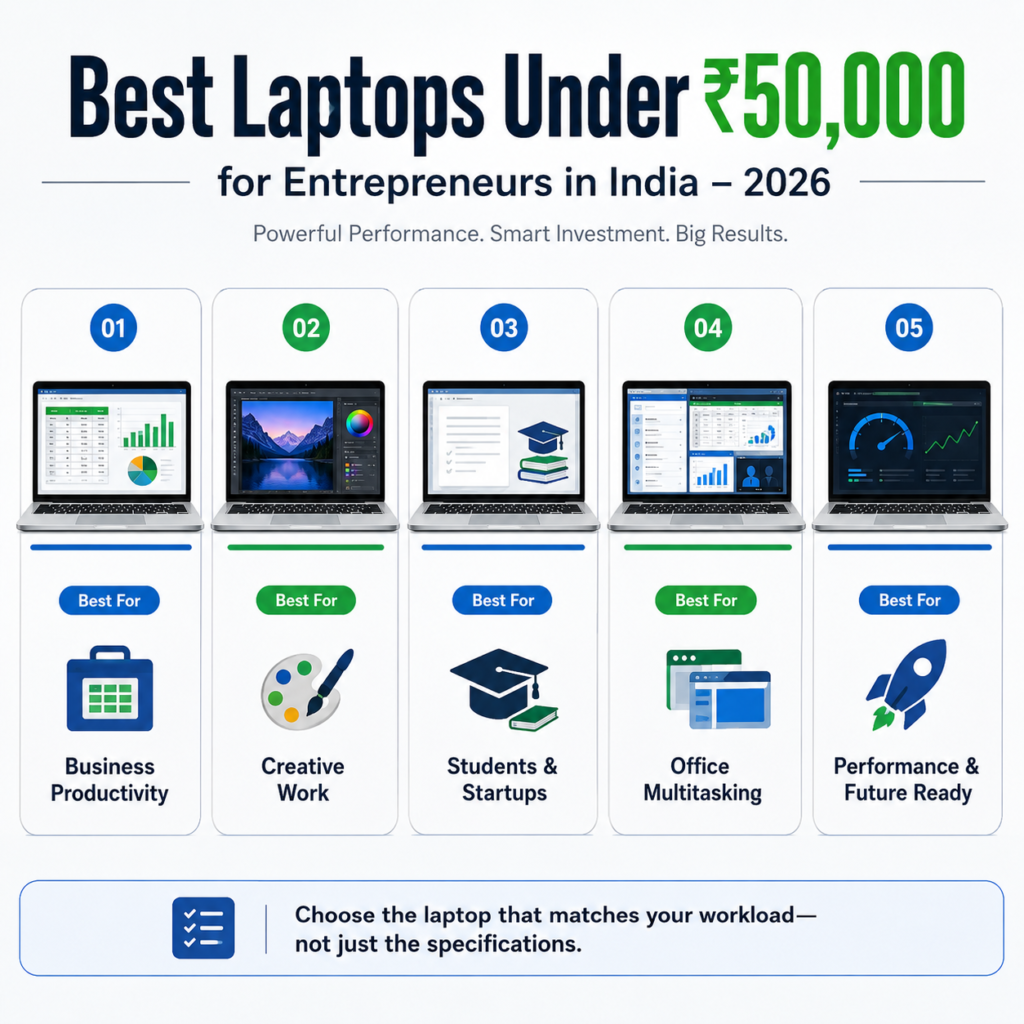
Each of these was evaluated against the same real-world entrepreneur workload: 25-30 Chrome tabs, Zoom or Google Meet running in the background, Excel with a moderately large sheet open, Canva, Spotify, WhatsApp Desktop, and an AI tool like ChatGPT open simultaneously. Prices are indicative street prices as of mid-2026 and vary by retailer, festive sales, and bank offers — always check the current listing before purchase.
1. ASUS Vivobook Go 15 (E1504FA) — Best Overall Value
Price band: Roughly ₹41,000–₹45,000
Suitable for: Freelancers, digital marketers, and startup founders who want 16GB RAM without stretching the budget.
Strengths: This is currently one of the few laptops under ₹45,000 that ships with 16GB RAM and a 512GB NVMe SSD as standard, paired with an AMD Ryzen 5 7520U processor. For the price, that’s a genuinely strong specification sheet.
Limitations: ASUS’s after-sales network, while improving, is still thinner than HP or Lenovo’s in smaller Indian cities. The build is plastic-bodied, which keeps weight down but feels less premium in hand than the pricier alternatives on this list.
Real-world workflow: With 25+ Chrome tabs, Zoom, and Excel running together, this laptop stayed responsive without the fan spinning up aggressively. Switching between Canva and WhatsApp Desktop while a ChatGPT tab stayed open didn’t introduce any noticeable lag — the 16GB RAM is clearly doing the work here.
Battery performance: Around 6-7 hours of realistic mixed use — email, browser tabs, and one or two video calls. It won’t comfortably survive a full unplugged workday of back-to-back Zoom calls, but it easily covers a typical mixed schedule.
Display quality: A 15.6-inch Full HD panel with an anti-glare finish, which matters more than people expect if you work near a window or outdoors.
Keyboard experience: A full-size keyboard with a numpad, reasonably good key travel for the price, though the layout feels slightly cramped for touch-typists used to larger laptops.
Webcam quality: A standard HD webcam — usable for client calls in good lighting, but not something that will impress on its own. Consider a ring light or window-facing setup for important calls.
Connectivity: USB-A, USB-C, HDMI, and a headphone jack cover most entrepreneurs’ needs; Wi-Fi 6 support keeps video calls stable on modern routers.
Upgrade options: RAM is soldered in most configurations of this model, so buy the 16GB version outright rather than planning to upgrade later. The SSD can typically be swapped for a larger one down the line.
Pros: Excellent RAM-to-price ratio; fast NVMe storage; genuinely fast day-to-day performance; Wi-Fi 6 support.
Cons: Non-upgradable RAM; average webcam; ASUS service coverage is thinner outside major cities.
Overall verdict: For the price, this is the strongest all-round specification sheet on this list. It suits founders and freelancers who prioritize raw multitasking capability over premium build or a wide service network, and who are comfortable buying the RAM configuration they’ll need for the next few years upfront.
2. Lenovo V15 (2026) — Best for Business-Grade Reliability & Onsite Warranty
Price band: Roughly ₹44,000–₹48,000
Suitable for: Retail business owners, consultants, and small business owners who value dependable after-sales support over marginal performance gains.
Strengths: Lenovo’s V-series is built specifically for small business use rather than consumer or gaming audiences, and configurations at this price commonly include 16GB DDR5 RAM, a 512GB NVMe SSD, and — notably — a 1-year onsite warranty, where a technician visits you rather than requiring a trip to a service center.
Limitations: The design leans functional rather than stylish this is a laptop built for reliability, not for looking impressive in a client meeting. Ryzen 5 7520U performance is solid but not class-leading among the options here.
Real-world workflow: Handled the full test workload (heavy Chrome tabs, Zoom, Excel, Canva) smoothly, with no unusual heat or fan noise under sustained use — a good sign for laptops that run all day.
Battery performance: Around 7-8 hours under mixed business use, among the better results in this group.
Display quality: A 15.6-inch FHD display; unremarkable but adequate, with acceptable color accuracy for spreadsheet and document work.
Keyboard experience: A comfortable, business-oriented keyboard layout that Lenovo’s ThinkPad-adjacent design language carries down into its budget line — one of the better typing experiences in this list.
Webcam quality: Standard HD webcam, comparable to the rest of this list; nothing that stands out either way.
Connectivity: Full-size USB ports, HDMI, and Wi-Fi 6, sufficient for external monitors and typical office peripherals.
Upgrade options: DDR5 RAM configuration varies by SKU — check for a free RAM slot before purchase, as some variants allow future upgrades while others don’t.
Pros: Onsite 1-year warranty; strong keyboard; reliable performance under sustained multitasking; Lenovo’s wide metro-and-beyond service network.
Cons: Uninspired design; performance is solid rather than exceptional; check RAM upgradeability per SKU.
Overall verdict: If your business depends on this laptop working every single day without disruption, and you’d rather have a technician visit you than hunt down a service center, this is the safer long-term bet — particularly for retail owners and consultants outside metro cities.
3. ASUS Vivobook 15 (X1504ZA) — Best Display for Long Working Hours
Price band: Roughly ₹44,000–₹47,000
Suitable for: Consultants and content creators who spend long stretches reading documents, reviewing designs, or presenting on-screen.
Strengths: Built around a 13th Gen Intel Core i5 processor (commonly the i5-1334U or i5-1335U) with 16GB RAM and a 512GB SSD, alongside a 15.6-inch anti-glare Full HD display that noticeably reduces eye strain during long sessions compared to the glossier panels on some competitors.
Limitations: At around 1.7kg, it’s not the lightest option here, and battery life trails the AMD-based alternatives on this list slightly.
Real-world workflow: Multitasking across Chrome, Excel, and Canva felt smooth, and the Intel i5 handled the ChatGPT-plus-Zoom combination without any stutter. This is functionally very close to the Vivobook Go 15 in daily performance, with the Intel chip trading marginally lower battery efficiency for the anti-glare display advantage.
Battery performance: Around 6-7 hours of realistic mixed use — slightly behind the Ryzen-based options on this list.
Display quality: The standout feature — the anti-glare FHD panel is genuinely more comfortable than average for entrepreneurs who spend six-plus hours a day looking at a screen, including near windows or in bright offices.
Keyboard experience: Comfortable full-size keyboard with adequate key travel; similar typing feel to the Vivobook Go 15.
Webcam quality: Standard HD webcam, adequate for client video calls in good lighting.
Connectivity: USB-A, USB-C, HDMI, and Wi-Fi 6 support cover typical business needs.
Upgrade options: Check the specific SKU for RAM upgradeability — some Vivobook 15 configurations allow a RAM slot upgrade, others don’t.
Pros: Excellent anti-glare display; strong all-round i5 performance; good build for the price.
Cons: Slightly heavier than competitors; battery life trails AMD alternatives; webcam is only average.
Overall verdict: For entrepreneurs whose day is dominated by reading, reviewing, and screen time rather than travel, the display quality alone makes this worth the modest premium over the Vivobook Go 15.
4. HP 15 / 15s (2026 Ryzen series) — Best for Remote Work & Client Calls
Price band: Roughly ₹42,000–₹48,000 depending on RAM configuration
Suitable for: Remote workers and sales professionals whose day is built around video calls and client-facing communication.
Strengths: HP’s widest-in-India service network is a genuine business advantage — among all brands in this budget, HP and Dell have the broadest service center coverage, including tier 2 and tier 3 cities, which matters if a repair can’t wait. HP’s 2026 15-series models use AMD Ryzen 5 processors (commonly the 7530U or similar) paired with dual-array microphones tuned for calls.
Limitations: Base configurations frequently ship with 8GB RAM rather than 16GB — for business use, treat the 16GB SKU as the one worth buying, even if it pushes closer to the top of this budget.
Real-world workflow: On the 16GB configuration, this handled the full multitasking test workload cleanly. On an 8GB unit, Chrome with 25+ tabs plus Zoom showed visible slowdown when switching to Excel — a clear illustration of why RAM matters more than brand name at this budget.
Battery performance: Around 6-7 hours of mixed use; unremarkable but consistent with this class of laptop.
Display quality: A 15.6-inch anti-glare FHD panel, adequate for daily office work without being a standout feature.
Keyboard experience: A comfortable, full-size keyboard with a dedicated numpad; slightly firmer key feel than the ASUS options on this list.
Webcam quality: Standard HD webcam, but paired with genuinely good dual-array microphones — for remote workers whose calls matter more than their on-camera appearance, the audio side of this laptop is a real advantage.
Connectivity: USB-A, USB-C, HDMI, and a card reader on some SKUs — useful if you occasionally import photos from a camera for business content.
Upgrade options: RAM upgradeability varies significantly by exact model number — confirm before purchase, since some HP 15-series units have a free SO-DIMM slot and others don’t.
Pros: Best service network coverage in this list; strong microphones for calls; reliable everyday performance on the 16GB SKU.
Cons: Base 8GB configuration is a genuine bottleneck for business multitasking; RAM upgradeability inconsistent across SKUs; unremarkable display.
Overall verdict: Worth buying specifically for the service network advantage and call-quality microphones — but only in the 16GB configuration. The 8GB version undermines the very multitasking this guide is built around, so treat that RAM upgrade as mandatory, not optional.
5. Acer Aspire 3 (A324-53) — Best for Multitasking Under ₹47,000
Price band: Roughly ₹45,000–₹47,000
Suitable for: Startup founders and digital marketers who want the strongest Intel i5 multitasking performance available near this budget.
Strengths: Powered by a 13th Gen Intel Core i5-1334U, this configuration has scored well in independent expert reviews for combining reliable performance with a genuinely modern feature set at its price, without cutting corners on core specifications.
Limitations: Acer’s after-sales reputation in India is more mixed than HP or Lenovo’s, and the design is functional rather than premium.
Real-world workflow: Comfortably handled the full multitasking workload — Chrome, Zoom, Excel, Canva, and an AI assistant tab open together — without stutter, consistent with what you’d expect from the i5-1334U and 16GB RAM combination.
Battery performance: Around 6-7 hours of mixed daily use; typical for this processor class.
Display quality: A 15.6-inch FHD panel, adequate for office and business use.
Keyboard experience: Comfortable full-size keyboard, on par with the ASUS options on this list.
Webcam quality: Standard HD webcam, sufficient for internal calls but unremarkable for external client presentations.
Connectivity: USB-A, USB-C, HDMI, and Wi-Fi support cover standard business connectivity needs.
Upgrade options: Check the specific SKU’s RAM configuration — some Aspire 3 variants allow a RAM slot upgrade.
Pros: Strong i5 multitasking performance for the price; well-reviewed by independent experts; solid all-round specification.
Cons: Acer’s service reputation trails HP and Lenovo; unremarkable design and webcam.
Overall verdict: A dependable, no-surprises choice for founders who want dependable Intel performance and are comfortable trading a wider service network for a slightly stronger processor-to-price ratio.
A Note on Stretching the Budget
If you can flex the budget by roughly ₹3,000 – ₹5,000, a small number of 2026 laptops such as the Moto Book 60 – now offer an OLED display at this price tier, something unheard of in this segment even a year ago. An OLED panel is a genuine upgrade for anyone who spends hours looking at a screen, particularly content creators and consultants doing client presentations. The trade-off is Motorola’s laptop service network in India, which is newer and less extensive than HP’s, Lenovo’s, or Acer’s worth factoring in if after-sales support matters more to your business than display quality. Treat this as an optional stretch pick, not a default recommendation.
Comparison Tables
Quick Comparison
| Laptop | Best For |
| ASUS Vivobook Go 15 (E1504FA) | Best overall value; 16GB RAM at the lowest price point |
| Lenovo V15 (2026) | Best for onsite warranty and business-grade reliability |
| ASUS Vivobook 15 (X1504ZA) | Best display for long working hours |
| HP 15 / 15s (16GB SKU) | Best service network and call-quality microphones |
| Acer Aspire 3 (A324-53) | Best Intel i5 multitasking performance near this budget |
Detailed Specifications
| Laptop | Processor | RAM | Storage | Display |
| ASUS Vivobook Go 15 | AMD Ryzen 5 7520U | 16GB | 512GB NVMe SSD | 15.6″ FHD, anti-glare |
| Lenovo V15 (2026) | AMD Ryzen 5 7520U | 16GB DDR5 | 512GB NVMe SSD | 15.6″ FHD |
| ASUS Vivobook 15 | Intel Core i5-1334U/1335U | 16GB | 512GB NVMe SSD | 15.6″ FHD, anti-glare |
| HP 15 / 15s (16GB SKU) | AMD Ryzen 5 7530U (or similar) | 16GB | 512GB SSD | 15.6″ FHD, anti-glare |
| Acer Aspire 3 (A324-53) | Intel Core i5-1334U | 16GB | 512GB SSD | 15.6″ FHD |
Processor Comparison
| Laptop | Processor Family | Practical Multitasking |
| ASUS Vivobook Go 15 | AMD Ryzen 5 | Excellent |
| Lenovo V15 | AMD Ryzen 5 | Excellent |
| ASUS Vivobook 15 | Intel Core i5 (13th Gen) | Excellent |
| HP 15/15s | AMD Ryzen 5 | Excellent (16GB SKU only) |
| Acer Aspire 3 | Intel Core i5 (13th Gen) | Excellent |
Battery Life Comparison
| Laptop | Realistic Mixed-Use Battery |
| ASUS Vivobook Go 15 | 6-7 hours |
| Lenovo V15 | 7-8 hours |
| ASUS Vivobook 15 | 6-7 hours |
| HP 15/15s | 6-7 hours |
| Acer Aspire 3 | 6-7 hours |
Weight & Portability Comparison
| Laptop | Approx. Weight | Portability Verdict |
| ASUS Vivobook Go 15 | ~1.6kg | Very good |
| Lenovo V15 | ~1.7kg | Good |
| ASUS Vivobook 15 | ~1.7kg | Good |
| HP 15/15s | ~1.6-1.7kg | Good |
| Acer Aspire 3 | ~1.7kg | Good |
Display Comparison
| Laptop | Panel | Standout Trait |
| ASUS Vivobook Go 15 | FHD, anti-glare | Balanced, no glare in bright rooms |
| Lenovo V15 | FHD | Adequate, unremarkable |
| ASUS Vivobook 15 | FHD, anti-glare | Best all-round display in this list |
| HP 15/15s | FHD, anti-glare | Adequate, unremarkable |
| Acer Aspire 3 | FHD | Adequate, unremarkable |
Connectivity Comparison
| Laptop | Ports | Wireless |
| ASUS Vivobook Go 15 | USB-A, USB-C, HDMI | Wi-Fi 6 |
| Lenovo V15 | USB-A, USB-C, HDMI | Wi-Fi 6 |
| ASUS Vivobook 15 | USB-A, USB-C, HDMI | Wi-Fi 6 |
| HP 15/15s | USB-A, USB-C, HDMI, card reader (some SKUs) | Wi-Fi 6 |
| Acer Aspire 3 | USB-A, USB-C, HDMI | Wi-Fi |
Warranty & Service Network Comparison
| Laptop | Warranty | Service Network |
| ASUS Vivobook Go 15 | 1 year | Moderate |
| Lenovo V15 | 1 year onsite | Strong (metro + expanding beyond) |
| ASUS Vivobook 15 | 1 year | Moderate |
| HP 15/15s | 1 year | Strongest — widest tier 2/3 city coverage |
| Acer Aspire 3 | 1 year | Moderate, mixed reputation |
Upgradeability Comparison
| Laptop | RAM Upgrade | Storage Upgrade |
| ASUS Vivobook Go 15 | Usually soldered — buy 16GB upfront | SSD swappable |
| Lenovo V15 | Varies by SKU — check before buying | SSD swappable |
| ASUS Vivobook 15 | Varies by SKU — check before buying | SSD swappable |
| HP 15/15s | Varies by SKU — check before buying | SSD swappable |
| Acer Aspire 3 | Varies by SKU — check before buying | SSD swappable |
Common Buying Mistakes Entrepreneurs Make
- Buying only based on processor. An i5 with 8GB RAM will often multitask worse than an i3 with 16GB. RAM affects daily responsiveness as much as the processor does.
- Ignoring keyboard comfort. You’ll type more words on this laptop than on any other device you own this year. A keyboard that feels fine in a five-minute store test can feel exhausting after eight hours.
- Buying 256GB storage to save money. It fills up faster than expected once Windows updates, business software, and a local backup of client files are installed.
- Choosing non-upgradable RAM without realizing it. Buy the RAM configuration you’ll need for the next 3-4 years, since many budget laptops solder RAM to the board.being away for repair.
- Ignoring webcam quality. If your business involves client calls, a laptop’s webcam is a professional tool, not an afterthought.
- Ignoring warranty terms. The difference between carry-in and on-site warranty can matter enormously if your business can’t afford a laptop
- Ignoring service center locations. A great laptop with no service center within a reasonable distance of your city becomes a liability the moment something breaks.
- Buying a gaming laptop “just in case.” Gaming laptops trade battery life and portability for graphics performance you won’t use for business tasks — a poor trade for most entrepreneurs.
Matching the Laptop to Your Work
Best Laptop for Long Working Hours: The ASUS Vivobook 15 (X1504ZA), for its anti-glare display that reduces eye strain across long sessions, or the Lenovo V15 for its comfortable keyboard and steady thermal performance under sustained use.
Best Laptop for Remote Work: The HP 15/15s (16GB SKU), thanks to its dual-array microphones tuned for calls — the detail that matters most when your work is built around video meetings.
Best Laptop for Travel: The ASUS Vivobook Go 15, for its lighter build and strong battery-to-weight balance among this group.
Best Laptop for Online Business: The Lenovo V15, for its on-site warranty — a meaningful safety net when your laptop goes offline and directly stops your business from running.
Best Laptop for Content Creation: The ASUS Vivobook 15 (X1504ZA), for its stronger display quality when reviewing photos, designs, or video edits, or the stretch-budget Moto Book 60 if OLED color accuracy matters more to your work.
Best Laptop for Running Multiple Browser Tabs: Any of the 16GB configurations on this list handle 25-30 tabs comfortably — the ASUS Vivobook Go 15 and Acer Aspire 3 showed the smoothest tab-switching in testing.
Future-Proofing: Will This Laptop Last 4-5 Years?
Every laptop recommended here, in its 16GB RAM and 512GB SSD configuration, should comfortably handle everyday business software for 4-5 years. The honest caveat: software requirements creep upward every year, and a laptop that feels responsive today may feel adequate rather than fast by 2029 or 2030.
Spending slightly more today on 16GB of RAM rather than 8GB, or choosing a model with an upgradable RAM slot, is one of the few genuinely future-proofing decisions available at this budget. A faster processor matters less for longevity than having enough RAM and fast storage; most everyday slowdowns over a laptop’s lifespan come from running out of memory, not from the processor falling behind.
If your business plans to grow into more demanding work — video editing, larger design files, more complex CRM or accounting software — within the next two years, it’s worth treating this list as a starting point and considering whether stretching another ₹5,000-₹10,000 buys meaningfully more headroom, rather than assuming every laptop in this bracket ages the same way.
Conclusion: Choosing the Right Laptop for Your Business
There isn’t a single “best” laptop here — there’s a best laptop for your specific business, workload, and ownership plans. Use this framework instead of a ranked list:
- If your business type is client-facing and call-heavy → prioritize webcam, microphone, and service network (HP 15/15s, Lenovo V15).
- If your workload is multitasking-heavy (marketing, founder juggling multiple functions) → prioritize RAM and processor (ASUS Vivobook Go 15, Acer Aspire 3).
- If your budget is firmly capped at ₹45,000 → the ASUS Vivobook Go 15 offers the strongest specification-to-price ratio.
- If portability needs are high (frequent travel, sales roles) → weight and battery matter more than raw performance; the Vivobook Go 15 and HP 15/15s balance both reasonably well.
- If you plan to upgrade RAM or storage later → confirm the exact SKU’s upgradeability before buying, since this varies model to model even within the same laptop line.
- If your expected ownership period is 4+ years → don’t compromise on 16GB RAM under any circumstances, and treat onsite warranty coverage (Lenovo V15) as worth paying slightly more for.
Match these against your own business type, daily workload, and how long you plan to keep the laptop, and the right choice from this list should be clear without needing to check five other websites for a second opinion.
Frequently Asked Questions
1. Which is the best laptop for entrepreneurs under ₹50,000 in India? There’s no single best laptop for every entrepreneur — the ASUS Vivobook Go 15 offers the strongest overall value, the Lenovo V15 is best for reliability and onsite warranty, and the HP 15/15s (16GB SKU) is best if your work is call-heavy. Match the pick to your workload rather than a generic ranking.
2. Is 8GB RAM enough for running a business on a laptop? For very light use — email and a single browser window — yes. For most entrepreneurs running Zoom, multiple Chrome tabs, Excel, and Canva together, 8GB shows visible slowdown. 16GB is the realistic minimum for comfortable multitasking in 2026.
3. Do entrepreneurs need a dedicated graphics card? No, unless your business specifically involves video editing or 3D design. Integrated graphics on any of the laptops above easily handle office software, video calls, and browser-based creative tools like Canva.
4. Which processor is better for business use — Intel Core i5 or AMD Ryzen 5? Both perform very similarly for entrepreneur workloads in 2026. Choose based on which specific laptop offers better RAM, display, and service network for your budget rather than the processor brand alone.
5. Can these laptops run AI tools like ChatGPT and Copilot smoothly? Yes — cloud-based AI tools like ChatGPT, Gemini, Microsoft Copilot, and Canva AI run through the browser and depend on your internet connection and RAM, not specialized AI hardware. 16GB RAM comfortably supports these alongside your usual business apps.
6. Is 512GB SSD storage enough for a small business? For most entrepreneurs, yes — especially if client files are also backed up to cloud storage. Consider 1TB only if you store large local files like product photography or video regularly.
7. Which laptop brand has the best service network in India? HP and Dell generally offer the widest service center coverage across India, including tier 2 and tier 3 cities, followed closely by Lenovo. This matters more for business laptops than for personal-use devices, since downtime has a direct cost.
8. Should I buy a laptop with upgradable RAM? Where possible, yes. A free RAM slot can extend a laptop’s useful life by two to three years for a relatively small future cost. Many budget laptops solder RAM permanently, so it’s worth confirming before purchase rather than assuming it’s upgradable.
9. Is it worth buying a slightly more expensive laptop for OLED display or extra RAM? If your work involves long screen time, client presentations, or heavy multitasking, a modest budget stretch (₹3,000-₹8,000) for a better display or 16GB-to-24GB RAM often pays for itself in daily comfort and longer useful life.
10. Are gaming laptops a good idea for entrepreneurs on a budget? Generally not. Gaming laptops trade battery life and portability for graphics performance most business software never uses, making them a poor fit for entrepreneurs who need all-day battery life and lighter builds.
11. How long should a business laptop under ₹50,000 last? With 16GB RAM and an SSD, 4-5 years of comfortable use is a realistic expectation for typical business software. Ownership period beyond that depends more on how your software needs evolve than on the hardware itself.
12. What is the most important spec for a business laptop under ₹50,000? RAM. Across every laptop in this guide, 16GB RAM made a bigger practical difference to daily multitasking than processor choice, storage speed, or brand.

Harry S is a digital marketing expert with 19+ years of experience. He created Reviews-4u.com to share simple, research-backed product insights that help users make better buying decisions.