
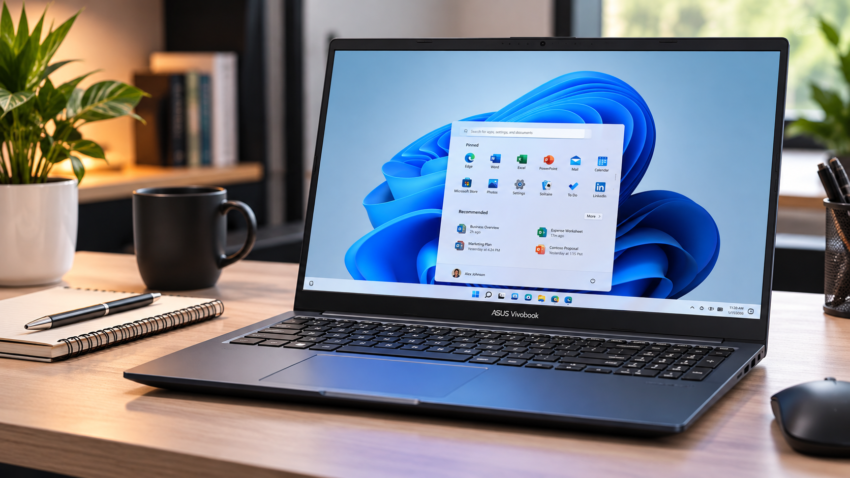
The ASUS Vivobook 15 lands on many Indian shortlists: a 15.6-inch screen, a full keyboard, wide service coverage and a price below the premium Zenbooks. The 2026 version is more complicated than its name suggests. ASUS sold several variants this year, and the newest, launched in July, is India’s first laptop with the Intel Core 5 320 processor.
This ASUS Vivobook 15 2026 review focuses on that model and one question: is it worth buying in India, and for whom? The Vivobook 15 name covers multiple processor, RAM and storage configurations, so verify the exact model/SKU before comparing prices or specifications.
How We Reviewed This Laptop
Reviews-4U has not personally benchmarked or battery-tested this model. This review uses ASUS’s published specifications, July 2026 India launch information and recent Indian listings. Where we cite independent testing of the same processor, it is credited to the tester and is not our result. Anything we expect, rather than know, is labelled as an expectation.
Quick Verdict
- Overall impression: A competent, plain everyday laptop whose value depends on the price you pay.
- Best suited for: Students, home users and office staff working in browsers and documents.
- Main strength: 16GB DDR5 and a 512GB SSD in the Core 5 320 model, with Office Home 2024 bundled.
- Main limitation: A dim 250-nit screen and a small 42Wh battery.
- Worth considering? Depends on price: not at the roughly ₹1 lakh listings we found for this model, but yes if it falls closer to its rivals.
Specifications at a Glance
| Specification | ASUS Vivobook 15 (Core 5 320) |
| Display | 15.6-inch Full HD (1920 × 1080), 60Hz |
| Processor | Intel Core 5 320 |
| Cores/threads | 6 / 6 |
| RAM | 16GB DDR5 |
| Storage | 512GB PCIe 4.0 NVMe SSD |
| Graphics | Integrated Intel Graphics |
| NPU | Intel NPU, up to 16 TOPS |
| Battery | 42Wh |
| Weight | 1.7kg |
| Operating system | Windows 11 Home |
These are ASUS’s launch specifications for the Core 5 320 model only, not every Vivobook 15 variant.
ASUS Vivobook 15 (2026): Price in India
The Vivobook 15 name covers multiple processor, RAM and storage configurations. Verify the exact model/SKU before comparing prices or specifications.
| Variant | Processor | RAM/storage | Reported price |
| Core 5 320 model (e.g. X1504MA-BQ126WS) | Intel Core 5 320 | 16GB DDR5 / 512GB | ₹1,07,990 July 2026 launch price (MRP ₹1,59,990) |
| Vivobook 15 (X1504MA) | Core 3 304 to Core 7 350 | Up to 16GB / 512GB | From ₹75,990 (July 2026 launch) |
| Older X1504VAP listings | Core 5 120U or Core 3 100U | 8GB / 512GB | ₹52,990–₹58,990 (Smartprix) |
₹1,07,990 is a launch-period price from 4 July 2026. Undated listings for the exact SKU ranged from ₹99,990 to ₹1,07,990, but we could not confirm today’s Amazon.in or Flipkart price and have not estimated one. Pricing varies by configuration and retailer, so check the exact SKU before buying. The rest of this review covers the Core 5 320 model unless stated.
Design and Build Quality
The Vivobook 15 is 17.9mm thick and weighs 1.7kg. That suits a bag carried a few times a week; daily commuters may prefer the 1.4kg Vivobook 14. The hinge opens a full 180 degrees.
ASUS says the laptop meets MIL-STD-810H, a US military test standard. That means it passed selected tests, not that it survives a fall. Launch material does not name the lid and deck materials.
Display
ASUS lists a 15.6-inch Full HD (1920 × 1080) anti-glare panel with a 60Hz refresh rate, 250 nits of brightness and 45% NTSC colour coverage.
Full HD is sharp enough for documents and video. The weak points are brightness and colour: 250 nits will struggle near a bright window, and 45% NTSC is roughly 60–65% sRGB, so colours will look muted.
We have not measured brightness or colour accuracy. Browsing, streaming and office work should be fine; colour-critical work is not what this panel is for. ASUS calls the X1504MA panel IPS, but the Core 5 320 model’s panel type is not named, so confirm it on the listing.
Performance
The Intel Core 5 320 has six cores and six threads, with boost speeds up to 4.6GHz, integrated Intel graphics and an NPU rated up to 16 TOPS. Reports describe two performance cores and four low-power cores. ASUS pairs it with 16GB DDR5.
We have not tested this Vivobook. Notebookcheck tested the same chip in a Dell XPS 13: multi-core performance landed near the older Core i7-1185G7 and single-core near a Core Ultra 7 256V. It judged the chip comfortable for browsing, 4K streaming and word processing, but not for games or photo editing. Cooling differs between laptops, so this is a guide, not a Vivobook score.
What that suggests for daily use:
- Browsing, Office and video calls: Should feel smooth, and 16GB helps with many tabs.
- Multitasking: With two performance cores, expect it to feel less relaxed than 8-core rivals when a call, many tabs and Excel run together. This is our expectation, not a measurement.
- Light creative work: Canva and basic photo resizing are realistic. Heavy editing is not.
- AI features: The Copilot key launches Microsoft’s Copilot assistant. Having an NPU does not make a laptop a Copilot+ PC: Microsoft requires an NPU of at least 40 TOPS, plus 16GB RAM and 256GB storage. This laptop meets the memory and storage bars but not the NPU, so do not buy it for Copilot+ features.
RAM and Storage
The Core 5 320 model has 16GB DDR5 and a 512GB SSD. The X1504MA family lists up to 16GB and 512GB, so cheaper variants may have 8GB.
8GB vs 16GB: 8GB copes with browsing and documents but gets tight with many tabs, video calls and Excel together. Buy 16GB if the laptop must last several years. One SO-DIMM slot is listed, so memory looks replaceable, but confirm the supported maximum with ASUS.
512GB vs 1TB: 512GB suits documents, coursework and apps. It is the top listed option, so heavy video or photo users should budget for an external SSD.
Battery Life
The battery is 42Wh, which is small for a 15.6-inch laptop. ASUS claims fast charging to 60% in 49 minutes, and the X1504MA family ships with a 45W adapter. A separate DC-in port is listed, so do not count on charging over USB-C.
Reviews-4U has not tested the battery and does not assign a battery-life figure to this model, and we found no independent test of the 2026 version. The only reference points are older X1504 Vivobooks with the same 42Wh pack but different chips: 8 hours 20 minutes of web browsing at 120 nits in LaptopMedia’s test, 6 hours 45 minutes in Trusted Reviews’ PCMark 10 office test, and about six hours in Tech Advisor’s.
Those results do not transfer: processor, brightness, workload and power settings all change runtime. Carry the charger on long days.
Keyboard, Trackpad and Webcam Features
The keyboard is backlit and full-size with a numeric keypad and Copilot key. Reviews-4U has not independently assessed typing comfort, and key travel is not specified. The touchpad has a built-in fingerprint scanner.
The webcam is 720p with a privacy shutter. We have not assessed its quality, including in low light, and microphone details are not specified, so heavy call users should consider a headset.
Ports and Connectivity
The launch model has one USB 2.0 Type-A, two USB 3.2 Gen 1 Type-A, one USB-C (USB 3.2 Gen 1), HDMI and a 3.5mm jack. Wireless is Wi-Fi 6 and Bluetooth 5.3. No SD card slot or Ethernet is listed.
- Students: Three USB-A ports cover pen drives and a mouse.
- Office users: HDMI handles projectors and monitors; display output over USB-C is not confirmed.
- Professionals: One 5Gbps USB-C, no Thunderbolt and no SD slot mean photographers and multi-monitor users need a dock.
Gaming and Heavy Workloads
Reviews-4U has not run game or editing tests. These points rest on the integrated-graphics specification and Notebookcheck’s finding that the chip’s graphics trail the Iris Xe in older ultrabooks.
- Casual gaming: Browser games and older or undemanding 2D titles only. This is not a gaming laptop.
- Esports and AAA gaming: Not recommended; we have no frame-rate data.
- Video editing and heavy multitasking: Simple 1080p trimming at most; 16GB handles memory, but the two performance cores are the likely limit.
- Professional workloads: CAD, 3D and data science need a stronger machine.
ASUS Vivobook 15 (2026): Pros and Cons
Pros
- 16GB DDR5 and a 512GB PCIe 4.0 SSD in the Core 5 320 model
- A listed memory slot, so RAM may be replaceable
- Three USB-A ports plus HDMI and USB-C
- 1.7kg body, 180-degree hinge, MIL-STD-810H claim
- Fingerprint sensor, webcam shutter, Office Home 2024
Cons
- A 250-nit, 45% NTSC, 60Hz screen
- A 42Wh battery, small for 15.6 inches
- Two performance cores, so modest multi-core headroom against 8-core rivals
- Listed prices well above rivals, and several variants sold under one name
- No SD slot, no Thunderbolt, Wi-Fi 6 only
Who Should Buy the ASUS Vivobook 15?
- Students: The 16GB model handles coursework and online classes.
- Office professionals and business users: The numeric keypad, fingerprint login, HDMI and bundled Office suit desk work. On a smaller budget, see our guide to laptops for entrepreneurs under ₹50,000.
- Freelancers, home users and light creators: Writing, admin, browsing, streaming and Canva are within range if colour accuracy is not critical.
Who Should Avoid It?
- Gamers and creators needing a dedicated GPU: Look at ASUS’s TUF Gaming range.
- Users needing stronger CPU performance: Code compilation or data work needs more cores.
- Anyone needing a better display: 250 nits suits bright rooms and colour work poorly.
- Users wanting long battery endurance: Look for a larger battery.
- Buyers wanting a premium feel: Build materials are unpublished. Look at the Zenbook line.
Before deciding, run through our checklist of common laptop buying mistakes.
ASUS Vivobook 15 (2026) vs Competition
We compared it with two 15-inch laptops with verifiable specifications and Indian listings. Listed prices are August–September 2026 snapshots and change often.
| Vivobook 15 (Core 5 320) | Lenovo IdeaPad Slim 3 15IRH10 (83K100CFIN) | HP OmniBook 3 15 (15-fn0007AU) | |
| Processor | Core 5 320 (6 cores) | Core i5-13420H (8 cores) | Ryzen AI 5 340 (6 cores) |
| RAM / storage | 16GB / 512GB | 16GB / 512GB | 16GB / 512GB |
| Display | 15.6-inch FHD, 250 nits | 15.3-inch 1920 × 1200 IPS, 300 nits | 15.6-inch FHD IPS |
| Battery | 42Wh | 50Wh | 41Wh |
| Weight | 1.7kg | 1.59kg | 1.7kg |
| Listed price | ₹99,990–₹1,07,990 (undated) | ₹67,200 (Smartprix) | ₹65,390–₹66,990 (Flipkart, Amazon.in) |
Performance: The Lenovo’s eight cores should give more multi-core headroom, though we have no side-by-side test. HP’s Ryzen AI 5 has a 50 TOPS NPU, above the Copilot+ threshold of 40.
The Lenovo is also brighter, lighter and has the largest battery. Value: On listed prices, both rivals sit roughly ₹33,000–₹42,000 below the Vivobook. We could not confirm today’s prices, and other Lenovo SKUs list higher, so compare the exact configuration. For cheaper options, see our best budget laptops in India guide.
Final Verdict
Should you buy the ASUS Vivobook 15 (2026)? It depends on the exact SKU and its price. At the roughly ₹1 lakh listings we found for the Core 5 320 model, no; if it falls close to rival prices, yes. Its strongest selling point is 16GB DDR5 with bundled Office; its biggest weakness is price.
- Students: Yes, at the right price, but carry the charger.
- Office and business use: Yes; the numeric keypad, fingerprint login and HDMI suit desk work.
- Configuration: 16GB with 512GB is the one to buy; avoid 8GB unless use is very light.
- Display: A real limitation for bright rooms and colour work.
- Battery: 42Wh is a concern away from a socket. We give no battery-life figure without testing.
- Price against rivals: The Lenovo and HP are listed for far less with comparable or stronger specifications.
FAQ
Is the ASUS Vivobook 15 good for students? Yes, for general coursework, if you pick the 16GB version. Carry the charger, and look elsewhere if your course needs a dedicated GPU.
Is the ASUS Vivobook 15 good for office work? Yes. The numeric keypad, fingerprint login, HDMI and bundled Office Home 2024 suit documents and meetings.
Does the ASUS Vivobook 15 have good battery life? Not verified. 42Wh is small for a 15.6-inch laptop, and we found no independent test of the 2026 model, so we give no figure. Carry the charger on long days.
Can the ASUS Vivobook 15 handle gaming? Only light, older or 2D games. It is not a gaming laptop.
Is the ASUS Vivobook 15 worth buying in 2026? Depends on price. At the roughly ₹1 lakh listings we found, rivals listed for less offer a brighter screen or larger battery. Closer to rival prices, yes.

Harry S is a digital marketing expert with 19+ years of experience. He created Reviews-4u.com to share simple, research-backed product insights that help users make better buying decisions.