
At the billing counter, right after you’ve picked a phone, comes the second sales pitch. “Sir, take the 256GB one, only ₹2,000 more; storage never feels like enough later.” Sometimes that’s good advice. Sometimes it’s just a push toward a pricier variant you’ll never fully use.
Storage decisions are harder to reverse than RAM decisions. You can live with a slightly slower phone, but you can’t take a photo when your camera says there’s no space left, and you can’t install the update your bank just pushed out. This guide walks through what actually eats storage in 2026, who genuinely needs to go beyond 128GB, and where the extra money is better spent instead.
Storage Isn’t Just About Photos Anymore
A decade ago, storage math was simple: photos, a few apps, some music. That math has broken down. On a typical 2026 phone, the OS itself, plus pre-installed apps and system updates, can occupy 20-30GB before you’ve added a single photo.
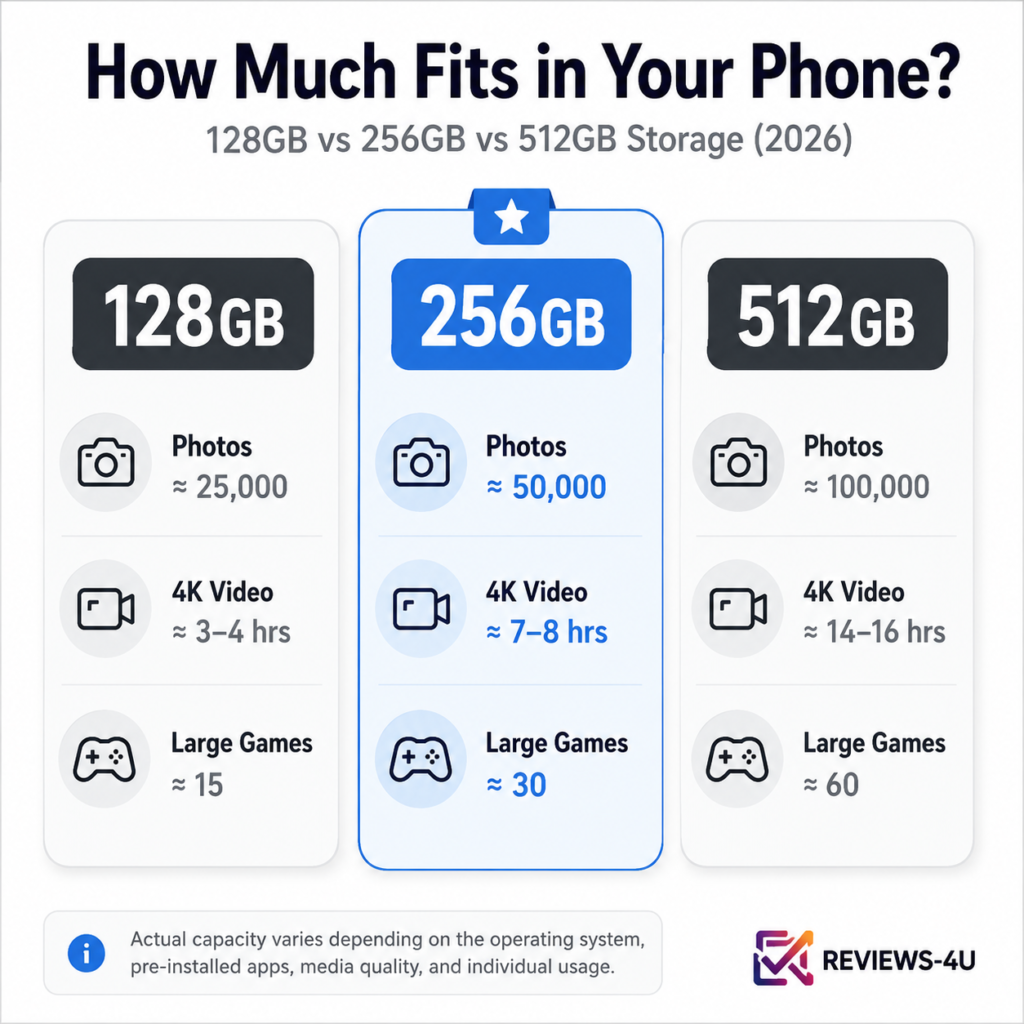
On-device AI features now sit permanently in storage instead of running purely in the cloud. Offline maps for one Indian state can take 1-2GB each, and most people keep two or three saved for road trips. Streaming apps store downloaded shows for flights and train journeys, often several GB per season. RAW photography, where supported, produces files five to ten times larger than a JPEG. Add 4K and, increasingly, 8K recording, chat media libraries that grow daily, and quietly accumulating cache, and the picture looks nothing like 2020.
Hidden Storage Consumers Most Buyers Ignore
This is the part that catches people off guard six months into owning a phone that felt generously sized at purchase.
WhatsApp is usually the biggest silent offender in India, since auto-downloaded photos, voice notes, and forwarded videos pile up in family and community groups unnoticed. Telegram behaves the same way when auto-download is left on, and Instagram builds up cache from every reel you’ve scrolled past, saved or not. AI photo editing tools often store both the original and edited version, quietly doubling storage use per photo.
Downloaded Netflix or Prime Video episodes, offline Spotify or YouTube Music tracks, Google Photos cache that duplicates images locally before backup, and browser downloads that never get deleted all add up in the background. None of this shows up clearly until you actually dig into the storage breakdown, which is exactly why so many buyers get blindsided.
Is 128GB Enough in 2026?
For a specific kind of user, yes, comfortably. If your phone use is mostly WhatsApp, Instagram, a couple of banking and shopping apps, YouTube, and calls, 128GB will serve you well for two to three years, especially if you’re disciplined about clearing chat media periodically.
This tier suits a senior citizen using a phone mainly for calls and family video chats, a casual social media user who doesn’t record much video, and business users whose actual work files live in the cloud or on a laptop. The trade-off is very little breathing room: if you never delete anything and shoot a lot of photos and video, you’ll feel the squeeze within a year, not three.
Who Should Buy 256GB?
This is the sweet spot for most Indian buyers in 2026, and not as a hedge; it’s a genuinely well-matched amount for how most people actually use a phone. A parent regularly photographing kids, festivals, and family events fits here, as does a working professional juggling productivity apps, offline maps, and downloaded shows for travel who doesn’t want to manage storage every few weeks.
A student handling lecture recordings, PDFs, several social apps, and moderate gaming also sits comfortably at 256GB. It gives roughly double the breathing room of 128GB for a modest price difference, without paying for capacity that sits unused.
Who Really Needs 512GB or More?
Fewer people need this tier than showrooms suggest, but for the right user, it’s necessary rather than excess.
A mobile gamer with several large titles installed at once, each 2-4GB and growing with every update, will fill 128GB or even 256GB fast once cached assets are included. A YouTube creator shooting and editing 4K footage directly on their phone needs space for raw clips, project files, and exports at once. A traveler recording video offline on long trips without reliable Wi-Fi, and a RAW photographer using a phone’s pro camera mode, both generate files far larger than casual users produce. If any of these matches your actual habits, not an occasional exception, 512GB earns its price premium.
What Happens When Phone Storage Becomes Full?
The slowdown rarely happens all at once; it creeps in. You start deleting old photos just to install an update. Backups to Google Photos or iCloud stall halfway. Then, at the worst possible moment, mid-trip or mid-event, the camera refuses to record because there isn’t enough space left.
App updates begin failing silently, which matters more than it sounds since security patches often get skipped, and general performance dips since both Android and iOS need free space to manage background processes efficiently. None of this is dramatic alone, but together it makes for a genuinely frustrating ownership experience.
Do Modern Apps, Games, and System Updates Use More Storage Than Before?
Yes, steadily rather than suddenly. Android’s system partition has grown with each release as manufacturers add on-device AI processing and default apps, and a single major OS update can now consume several gigabytes on its own. Everyday apps follow the same pattern: banking, food delivery, and social apps have doubled or tripled in size since 2020 as they’ve packed in more embedded video and AI tools, and a competitive mobile game that was 2GB in 2020 can easily be 6-8GB today, before counting what it downloads after install.
How Much Space Do Photos, Videos, and Games Actually Take
Numbers help more than vague warnings here.
| Content Type | Approximate Storage |
| Standard JPEG photo | 3-6 MB |
| RAW photo | 20-40 MB |
| 1080p video (per minute) | 90-130 MB |
| 4K video (per minute) | 350-500 MB |
| 8K video (per minute) | 1.2-1.5 GB |
| Casual mobile game (e.g., puzzle, card games) | 100-500 MB |
| Mid-size mobile game (e.g., racing, MOBA titles) | 2-4 GB |
| Large competitive/open-world game | 6-10 GB+ |
| One WhatsApp group’s monthly media | 500 MB-2 GB |
| Downloaded HD show season (offline viewing) | 3-6 GB |
A single ten-minute 4K video, something most people record without a second thought at a wedding or trip, can use up 4- 5 GB on its own. That single habit explains why storage disappears faster than buyers expect.
How Much Storage Do AI Features Actually Consume?
On-device AI models, the kind powering offline translation, AI photo editing, and local voice assistants, must be stored permanently on the phone rather than streamed from a server each time. Depending on how many AI features ship active by default, this can account for several gigabytes most buyers never budget for.
The trend only goes one direction: as phones process more locally for speed and privacy, AI’s storage footprint will keep growing. If you use these tools heavily, it’s worth reading our breakdown of which AI features on 2026 smartphones actually matter versus which ones are mostly marketing polish, since that also shapes how much storage they realistically demand.
Should You Rely on Cloud Storage Instead of More Local Storage?
Partially. Google Photos, iCloud, and similar services are genuinely useful for backing up photos once files are safely synced, but cloud backup depends on a stable connection, and connectivity during travel, monsoon outages, or in smaller Indian towns isn’t always reliable enough to depend on entirely.
There’s also the everyday reality that active files, the apps you’re using, the game you’re playing, the show downloaded for a flight, all need local storage regardless of your cloud plan. Cloud storage is a good backup strategy; it isn’t a substitute for adequate local storage, and treating it as one is where a lot of buyers get caught out.
Is Expandable Storage Still Relevant in 2026?
Less than it used to be. Most current phones, including budget models, have dropped microSD slots for a sealed design, partly for water resistance and partly because built-in UFS storage outperforms memory cards. Where slots do survive, mainly on certain budget and rugged phones, they help expand space for media files, but apps and games generally can’t be installed onto a card the way they once could. If expandable storage matters to you, check for it specifically, since it’s no longer a safe assumption.
Can Phone Storage Be Upgraded Later?
No, unlike a laptop’s storage drive, a smartphone’s storage is soldered directly onto the motherboard. There’s no swapping it for a bigger chip later, and no repair-shop upgrade path. Whatever tier you choose at purchase is what you live with for the phone’s entire lifespan, which is exactly why getting this decision right upfront matters more than it does for most other electronics.
Does Higher Storage Improve Resale Value?
Somewhat, though it’s a smaller factor than most sellers assume. A 256GB variant typically resells for a modest premium over the 128GB version, since second-hand buyers carry the same storage anxieties as new buyers. But the resale gap rarely matches the price paid at purchase, and battery health and remaining software-update years usually matter more to resale pricing than the storage tier alone.
The Cost of Buying Too Little Storage
The financial cost is small, but the day-to-day friction is constant: deleting photos every few weeks just to install an update, cloud backups that stall as you offload files under pressure, and running out of space mid-trip with no easy way to clear it. It also shows up as a camera that refuses to record mid-event and updates, sometimes security patches, that fail quietly in the background. None of it feels like a disaster alone, but together it makes for constant, low-grade management rather than just using the device.
The Cost of Buying Too Much Storage
The opposite mistake is quieter but just as real: paying a meaningful premium for 512GB when your actual usage would comfortably fit in 256GB for years. That difference, often ₹3,000-₹6,000, is money that could have bought a better camera sensor, a larger battery, or an extra year or two of guaranteed software updates on a different variant. Unused storage capacity doesn’t make a phone feel faster or better day to day. If your usage doesn’t match the “who needs 512GB” list above, that budget is almost always better redirected elsewhere.
Storage Decision Matrix
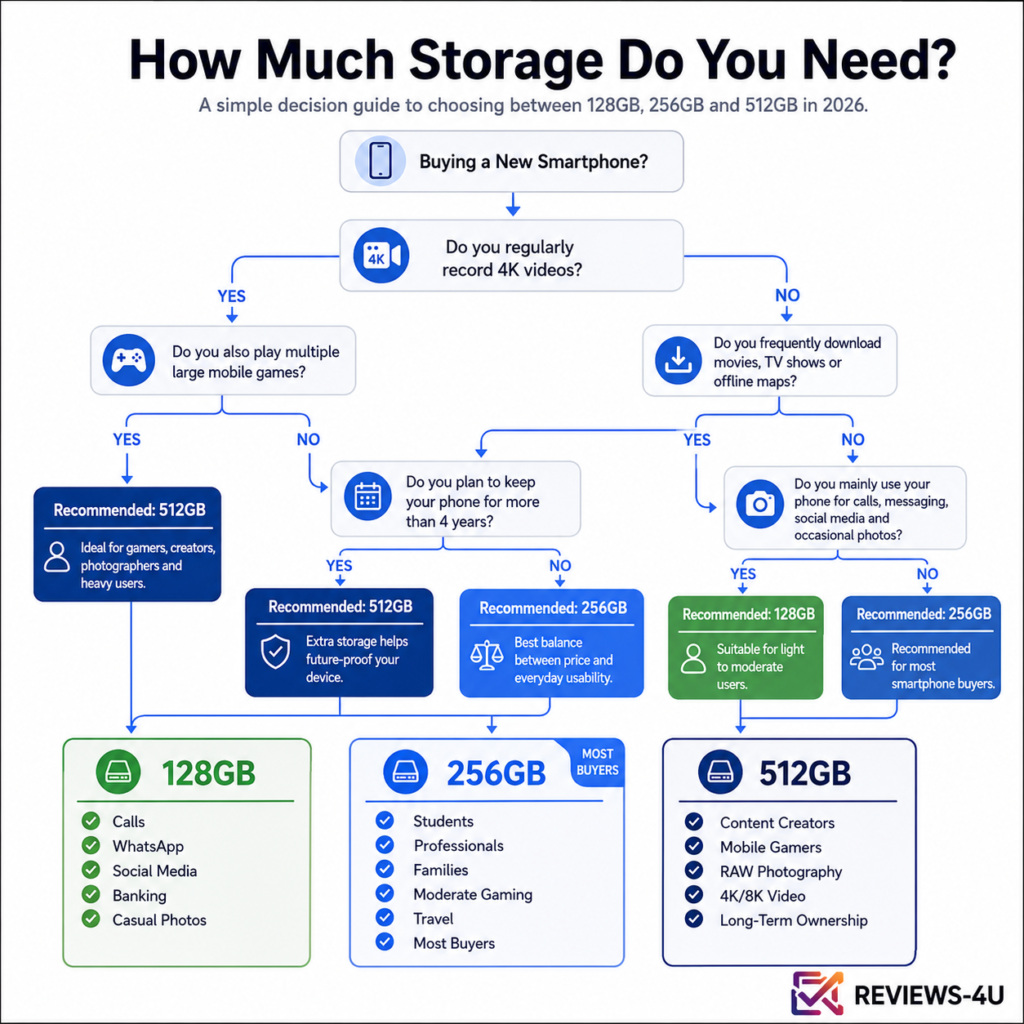
| User Type | Recommended Storage | Why |
| Student | 256GB | Lecture recordings, PDFs, moderate gaming, and social apps add up faster than expected |
| Professional | 256GB | Work apps, cloud-synced files, occasional offline downloads for travel |
| Photographer | 512GB | RAW files and edited duplicates consume space far faster than JPEGs |
| Gamer | 512GB | Multiple large titles plus updates and cached game data fill storage quickly |
| Traveler | 512GB | Offline maps, downloaded shows, and video recorded without reliable Wi-Fi to offload |
| Content Creator | 512GB or more | Raw 4K/8K footage, project files, and exports need to coexist on-device |
| Senior Citizen | 128GB | Calls, messaging, and video calls with family rarely demand more |
| Business User | 256GB | Email, communication apps, and moderate document handling, with heavy files usually cloud-based |
Buying Recommendations by Budget
In budget phones, up to roughly ₹20,000, 128GB is often the base with 256GB as a step-up. Unless you’re a heavy gamer or video recorder, the base tier is usually adequate, and our pick of the best budget smartphones in 2026 is a useful starting point here.
In mid-range phones, roughly ₹20,000-₹40,000, 256GB has become the practical default, and the small premium over 128GB is usually worth paying given the modest gap relative to overall price.
In premium and flagship phones, above ₹40,000, tiers usually start at 256GB and run to 512GB or 1TB. Buyers weighing options like the iPhone 18 against the Pixel 11, or variant differences within the Samsung Galaxy S26 series, should decide storage using the checklist above rather than defaulting to the highest number available.
Foldables deserve a separate note: their screens encourage more multitasking and media consumption, and the higher price point makes 512GB a reasonable default even for buyers who wouldn’t need it on a regular slab phone.
Future-Proofing: How Storage Needs Have Changed Since 2020
In 2020, 64GB was still a common baseline, and 128GB felt generous. By 2026, 128GB is closer to entry-level, and 256GB has become the realistic baseline for anyone who takes photos and videos regularly, a shift driven by larger apps, heavier operating systems, on-device AI, and higher-resolution cameras rather than people simply hoarding more content.
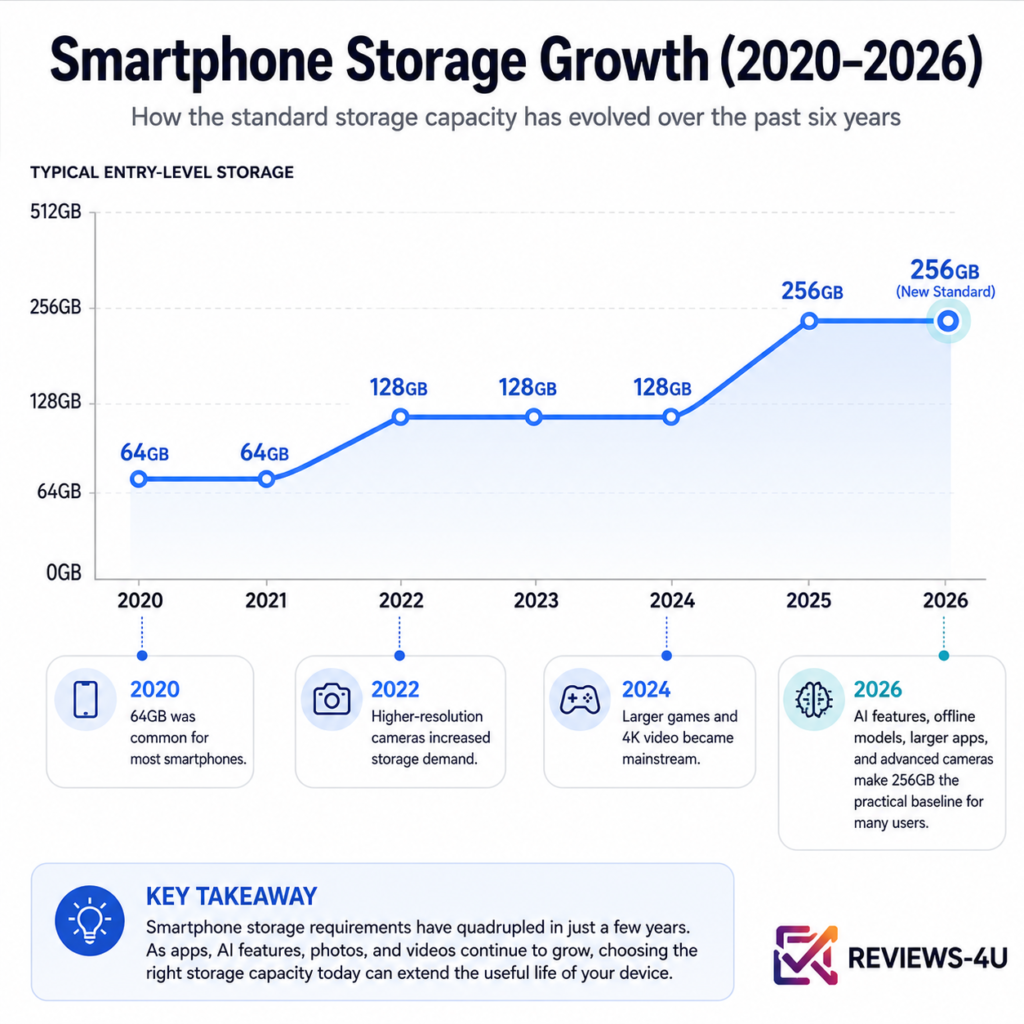
Expect this to continue, not reverse, over the next three to five years, as AI features move further on-device and 8K recording spreads to mid-range phones. If you plan to keep a phone for four or more years, buying one storage tier above your current comfortable amount is a reasonable hedge, similar to the reasoning behind buying slightly more RAM than you strictly need today, a principle we cover in our guide on whether 16GB RAM is actually necessary in 2026.
Common Myths About Phone Storage
“Cloud storage means I don’t need local storage.” Cloud backup protects your files, but active apps, games, and downloaded content for offline use still need local space regardless of how much cloud storage you have.
“512GB automatically makes a phone faster.” Storage capacity and storage speed are different things. A 512GB phone with slower UFS storage can feel less responsive than a 256GB phone with faster storage. Capacity affects how much you can keep; speed affects how quickly the phone reads and writes it.
“I can upgrade storage later.” Smartphone storage is soldered in at the factory. Unlike a laptop, there is no upgrade path after purchase.
“MicroSD cards solve every storage problem.” Where available, microSD expansion helps with media files like photos, music, and videos. Still, many phones no longer include the slot at all, and apps generally cannot be moved onto a memory card the way they once could.
Is Paying Extra for More Storage Worth It, and How Do You Decide?
This comes down to how you use your phone today, not a universal answer. Work backward from three questions: how much video do you actually record in a typical month, do you download content for offline use regularly, and how long do you plan to keep this phone. A casual user replacing their phone every two years and a content creator keeping one for five will land in completely different places, even on similar budgets.
If your habits genuinely match the higher tiers described above, the extra spend is worthwhile and saves you years of managing a full phone. If they don’t, that money is consistently better spent on a stronger camera, a bigger battery, or a longer software-update window, since all three shape daily experience more than unused storage headroom ever will. Match the tier to the matrix above, and put whatever you save toward a spec you’ll actually notice using every day.
FAQ Section
Is 128GB storage enough for a smartphone in 2026? For light to moderate users focused on messaging, social media, and calls, yes, especially with periodic cleanup of chat media. Heavy photo, video, or gaming use will outgrow it faster than expected.
What is the ideal smartphone storage for most people in 2026? 256GB has become the practical sweet spot for most Indian buyers, balancing everyday photo and video use with a reasonable price premium over 128GB.
Do I need 512GB storage on my phone? Only if you regularly shoot 4K/8K video, play several large games simultaneously, edit content on-device, or travel with limited access to Wi-Fi for offloading files. Most users don’t need this tier.
Does higher storage make a phone faster? No. Storage capacity and storage speed are separate. A phone’s speed comes mainly from its processor and RAM, along with the speed of its storage chip (UFS generation), not the total capacity available.
Can I add a memory card if my phone runs out of storage? Only if the phone has a microSD slot, which is increasingly rare on modern phones. Even where available, apps typically can’t be installed directly onto the card.
Is cloud storage a substitute for phone storage? No. Cloud storage backs up your files, but active apps, games, and offline downloads still require local storage regardless of your cloud plan.
How much storage do 4K videos use on a phone? Roughly 350-500MB per minute of 4K footage, meaning a single 10-minute clip can use 3.5-5GB.
Does AI on smartphones use more storage? Yes. On-device AI models for features like offline translation and AI photo editing are stored permanently on the phone, adding several gigabytes depending on how many AI features are active by default.
Will more storage help my phone sell for more later? Slightly, but the resale premium rarely matches the original price paid for the higher tier. Battery health and remaining software update years typically matter more to resale value.
Is it better to buy more storage now or upgrade later? There is no upgrade-later option for smartphone storage, unlike laptops. Whatever tier you choose at purchase is permanent for the life of the phone, which is why it’s worth deciding carefully upfront.

Harry S is a digital marketing expert with 19+ years of experience. He created Reviews-4u.com to share simple, research-backed product insights that help users make better buying decisions.