
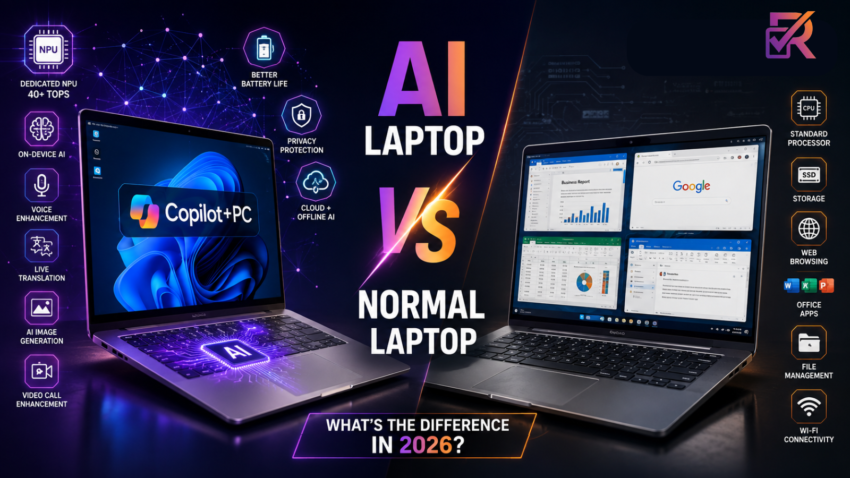
Every laptop advert seems to carry the same label now: AI Laptop. AI PC. Copilot+. Walk through an electronics store or scroll through Amazon India, and it looks like every new machine has suddenly become “smart.” So what’s actually different inside these laptops, and is it worth paying more for, or is it just a sticker?
This guide breaks that question down properly. You’ll learn what an AI laptop actually is, how it differs from a regular laptop under the hood, the genuine pros and cons of each, and based on how you actually use a laptop, whether upgrading in 2026 makes sense for you.
What Is an AI Laptop?
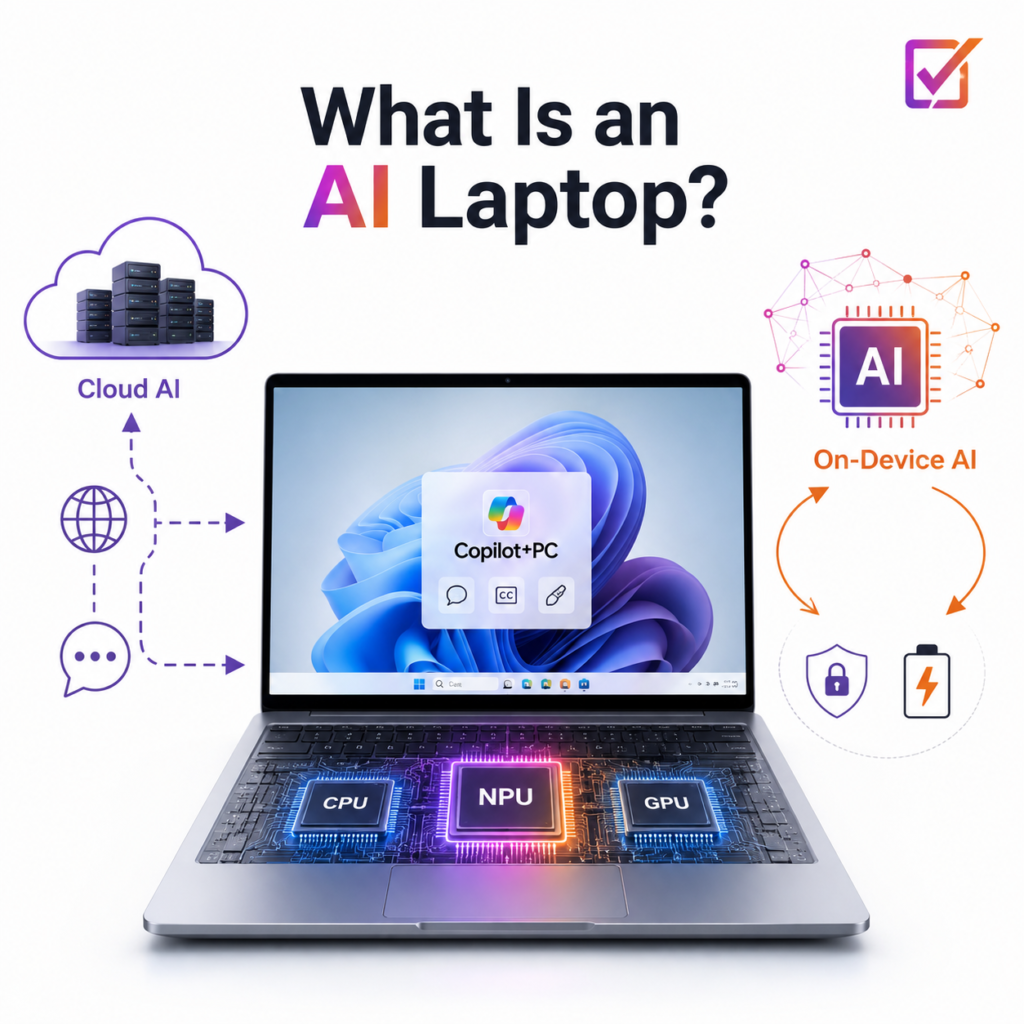
An AI laptop is a laptop built around a dedicated NPU (Neural Processing Unit) — a chip designed specifically to run AI and machine-learning tasks, sitting alongside the regular CPU and GPU.
The distinction that matters is where the AI processing happens. Cloud AI tools like ChatGPT or Google Gemini run on remote servers: you type a prompt, it travels over the internet, gets processed elsewhere, and the answer comes back. An AI laptop’s NPU processes certain AI tasks locally, on the device itself, without that round trip.
Microsoft’s Copilot+ PC label refers to the top tier of this category. To carry it, a laptop needs an NPU rated at a minimum of 40 TOPS (Tera Operations Per Second) — a measure of how many AI calculations the chip can perform every second, plus Windows 11 features like Recall, Live Captions with translation, and Cocreator in Paint.
What Is a Normal Laptop?
A normal (or traditional) laptop still runs on the components that have defined laptops for two decades: a CPU for general processing, a GPU (integrated or dedicated) for graphics, RAM for multitasking, and an SSD for storage. There’s no chip set aside specifically for AI work.
That doesn’t mean a normal laptop can’t use AI. Most of what people mean by “using AI” today ChatGPT, Google Gemini, Claude, Grammarly- runs in the cloud through a browser, so any laptop with a decent CPU and internet works fine. What it can’t do is run AI features locally and offline, or handle them with a dedicated NPU’s speed and battery efficiency.
Storage still plays a bigger role in everyday responsiveness than most buyers realise — an old HDD will make even a powerful CPU feel sluggish. If you’re unsure where your current laptop stands, our SSD vs HDD vs NVMe comparison breaks down exactly what each drive type changes in daily use.
AI Laptop vs Normal Laptop: Comparison Table
| Feature | AI Laptop (NPU) | Normal Laptop |
| Dedicated NPU | Yes (40–80 TOPS) | No |
| On-device AI | Full support, works offline | Limited — mostly cloud-dependent |
| Battery life | Better (AI work offloaded from CPU) | Standard |
| Background blur/video effects | Hardware-accelerated | CPU-driven, drains battery faster |
| Real-time translation | Offline-capable | Needs an internet connection |
| Windows Copilot | Full Copilot+ features (Recall, Cocreator) | Basic cloud Copilot only |
| Price in India | Roughly ₹80,000–₹2,00,000+ | Roughly ₹25,000–₹1,50,000+ |
| Software ecosystem | Growing through 2026 | Mature, broad compatibility |
| Best for | Future-facing, AI-heavy workflows | Day-to-day tasks, budget buyers, gaming |
For a closer look at specific certified models across this price range, see our Best AI Laptops in India (2026) guide.
What Makes AI Laptops Different?
The NPU is the headline difference, but it shows up in several concrete ways rather than one big feature:
- Faster AI workloads: Tasks like image upscaling or background removal run through the NPU instead of competing with the CPU for resources.
- Better battery optimisation: NPUs are built to do AI-specific math using far less power than a CPU doing the same job.
- Real-time translation and live captions: These process on-device, so they work in a lift, a train, or anywhere without signal.
- Noise cancellation and background blur: Windows Studio Effects run through the NPU during video calls, freeing up the CPU for everything else running in the background.
- On-device image generation and small local LLMs: Copilot+ machines can run compact AI models like Microsoft’s Phi series directly on the laptop, without a subscription or an internet connection.
None of this replaces cloud AI tools; it runs alongside them, handling the tasks that benefit from staying local.
Benefits of AI Laptops
- Longer battery life during AI-heavy tasks, since the NPU is more power-efficient than routing everything through the CPU
- Smoother video calls with hardware-accelerated blur, framing, and noise cancellation
- Privacy — features like Recall store data locally rather than uploading it to a server
- Offline AI access for transcription, translation, and note summarisation
- Access to newer Windows features as Microsoft continues building Copilot+ exclusive tools through 2026 and 2027
- Faster creative workflows for photographers and video editors using AI-assisted editing tools
Limitations of AI Laptops
Being balanced here matters, because AI laptops aren’t the right purchase for everyone:
- Higher upfront price — genuinely Copilot+ certified machines mostly start closer to ₹80,000 in India
- Limited AI-native apps today — most software still hasn’t been rebuilt actually to use the NPU
- A fast-moving category — features and app support are still expanding, so a 2026 model won’t have everything a 2027 one does
- Not universally useful — a student who only browses and writes documents won’t notice much difference day to day
- Cloud AI still dominates — the AI tools most people already use (ChatGPT, Gemini) work identically on a normal laptop with internet access
Before spending extra on any AI-branded laptop, it’s also worth running through our guide to common laptop buying mistakes; several of them apply directly to this category, particularly around chasing a spec without checking your actual use case first.
Do You Really Need an AI Laptop?
Students
Worth upgrading? Usually not required. Coursework, browsing, and writing don’t need an NPU. Research-heavy or tech-adjacent courses can benefit from on-device transcription and summarisation, but pairing the right AI software with a solid traditional laptop often matters more than the hardware. Our Best AI Tools for Students guide covers that side in detail.

Office users
Worth upgrading? Situational. If your day is full of video calls, an AI laptop’s background effects and noise cancellation genuinely help. For spreadsheets and email alone, a normal laptop with 16GB RAM does the job just as well.
Content creators
Worth upgrading? Yes, generally. AI-assisted editing, background removal, and upscaling tools benefit directly from NPU acceleration, and the battery gains matter for anyone editing on the move.
Developers
Worth upgrading? Depends on the workflow. On-device code completion using local models is genuinely useful, but compiling large codebases still leans on CPU and RAM more than the NPU. x86 compatibility can matter too if you rely on niche tools; ARM-based Copilot+ machines occasionally have gaps there.
Business users
Worth upgrading? Yes, if budget allows. Long battery life, strong video-call quality, and local data handling for Recall all suit business travel. If ₹80,000+ doesn’t fit the budget right now, our Best Laptops for Entrepreneurs Under ₹50,000 guide covers reliable traditional options instead.
Casual browsing
Worth upgrading? No. Streaming, social media, and light browsing don’t touch the NPU at all. Spending extra here mostly pays for a label you won’t use.
AI Laptop vs Normal Laptop for Everyday Tasks
| Task | AI Laptop | Normal Laptop |
| Web browsing | Same experience | Same experience |
| Office work | Same experience | Same experience |
| Zoom / Teams calls | Noticeably better effects, less CPU strain | Works fine, effects are CPU-driven |
| Video editing | Faster AI-assisted steps (upscaling, cuts) | Fine with a dedicated GPU, slower on AI steps |
| Photo editing | Faster AI tools (object removal, enhance) | Works, but AI filters run slower |
| Programming | No real advantage from the NPU | Same performance |
| Gaming | Usually weaker — NPUs aren’t GPUs | Better if it has a dedicated GPU |
| Streaming | Same experience | Same experience |
| AI tools (cloud) | Same experience — both need internet | Same experience |
AI Laptop vs Gaming Laptop
These two get confused constantly, but they solve different problems. A gaming laptop is built around a dedicated GPU for rendering graphics; that’s what actually determines frame rates. An AI laptop’s NPU handles machine-learning tasks and does essentially nothing for gaming performance.
A laptop can be both, but it’s rare and usually expensive: a strong dedicated GPU for gaming, plus a modern chip with an NPU for AI extras. If gaming is your priority, spend on the GPU first. An NPU is a bonus feature there, not the reason to buy.
Should You Upgrade in 2026?
- First laptop / very old machine (5+ years): Worth considering an AI laptop if budget stretches to ₹80,000+, for years of relevant software support ahead.
- Laptop from 2022–2024: Usually still capable. Upgrade only if you specifically need AI-heavy features now, not just because something newer exists.
- Already own a premium laptop: Wait, the AI ecosystem is still filling in, and today’s NPUs will look modest next to 2027’s chips.
- Budget-constrained: A traditional laptop stays the smarter buy below ₹60,000. Our Best Budget Laptops in India (2026) guide covers solid picks across every band.
Best AI Laptop Processors in 2026

Intel Core Ultra (Series 3, “Panther Lake”): Launched in early 2026 on a newer 18A manufacturing process, with an NPU rated up to 50 TOPS and stronger integrated Arc graphics. Many budget and mid-range AI laptops still ship with the older Core Ultra 200V/200H chips, which remain capable and increasingly discounted.
AMD Ryzen AI (400 series, “Gorgon Point”): Builds on the same Zen 5 foundation as Ryzen AI 300, with an upgraded XDNA 2 NPU and strong integrated Radeon graphics, a good fit for light gaming alongside AI features without a dedicated GPU.
Qualcomm Snapdragon X Elite / X2 Elite: The ARM-based option, known for the best battery life here, often 13–17+ hours of real use. The newer X2 Elite pushes NPU performance up to roughly 80 TOPS. The trade-off remains software compatibility: most mainstream apps run well, but some legacy 32-bit Windows software still has gaps on ARM.
Apple M-series (M5 / M5 Pro / M5 Max): No “Copilot+” branding here, but Apple Silicon has had a dedicated Neural Engine since the original M1. The current M5 generation adds a Neural Accelerator inside every GPU core, a genuine on-device AI competitor, just marketed differently.
Pros & Cons
AI Laptop
- ✅ Better battery life for AI-heavy tasks
- ✅ Offline AI features, better privacy
- ✅ Smoother video calls and creative AI tools
- ✅ Better positioned for future Windows features
- ❌ Higher starting price (~₹80,000+ for genuine Copilot+ certification)
- ❌ Software ecosystem still maturing
- ❌ No real gaming advantage
Normal Laptop
- ✅ Lower price across every budget band
- ✅ Mature, broadly compatible software
- ✅ Works fine with cloud AI tools (ChatGPT, Gemini) given internet access
- ❌ No offline/on-device AI processing
- ❌ CPU handles video-call effects less efficiently
- ❌ Will gradually miss newer Copilot+-exclusive features
Frequently Asked Questions
What is an AI laptop? A laptop with a dedicated NPU that handles AI tasks like transcription, background blur, and image generation directly on the device, rather than relying on the CPU or a cloud server.
Can AI laptops run ChatGPT offline? No — ChatGPT runs on OpenAI’s servers regardless of hardware. What runs offline are on-device features like Recall, live captions, and smaller local language models.
Is an AI laptop faster than a normal laptop? Not for everyday use like browsing or typing, only for AI-driven tasks like live video effects and translation, since the NPU handles those instead of the CPU.
Is an NPU necessary in 2026? Not for most people. It matters if you rely on real-time video effects, transcription, or on-device AI regularly. For document work and browsing, a normal laptop covers everything.
Are AI laptops good for students? It depends on the course. Tech, media, and research students benefit from on-device transcription and summarisation. For general coursework, a solid traditional laptop under ₹60,000 is usually the more practical choice.
Is Windows Copilot free? The basic version is free on any Windows 11 PC. The full Copilot+ feature set — Recall, Cocreator, offline Live Captions — needs Copilot+ certified hardware with a 40+ TOPS NPU.
Are AI laptops worth buying? For buyers with roughly ₹80,000+ to spend who want a laptop that stays relevant through 2028, yes. Below that, or for gaming-first and legacy-software users, a normal laptop remains the sensible pick.
What’s the difference between an AI PC and a normal laptop? The NPU. A normal laptop routes every task, AI included, through its CPU and GPU. An AI PC has a chip built specifically for AI work, running it faster and with less battery drain.
Can I use AI software on a normal laptop? Yes — cloud tools like ChatGPT, Gemini, and Claude work fine in any browser with internet access. What you lose without an NPU is offline processing and on-device features like Recall.
Will AI laptops last longer before feeling outdated? In software terms, likely yes. As more Windows and third-party features become NPU-accelerated through 2026–2027, a laptop without one will gradually lose access to newer AI functionality, even if it still runs everyday tasks fine.
Key Takeaways
- The core difference is a dedicated NPU — not a marketing label
- Copilot+ certification requires 40+ TOPS of NPU performance
- Cloud AI tools (ChatGPT, Gemini) work identically on both laptop types with internet access
- Genuinely certified AI laptops in India mostly start around ₹80,000
- Gaming performance depends on the GPU, not the NPU — the two aren’t related
- There’s no universal winner: match the laptop to what you actually do daily
Who Should Buy an AI Laptop? — Quick Summary
Buy an AI laptop if: you’re on video calls daily, edit photos/video regularly, travel often and want the best battery life, or want a laptop that stays current with Windows AI features through 2028.
Stick with a normal laptop if: you mainly browse, write documents, or game, and especially if your budget sits under ₹60,000, where traditional laptops offer far better value per rupee.
Conclusion
AI laptops aren’t just a marketing trend; the dedicated NPU is a real architectural change that makes on-device AI tasks faster and more battery-efficient. But they also aren’t essential for everyone. If you’re buying new in 2026 and want stronger battery life, better video calls, and features that will keep expanding through 2027, an AI laptop is a reasonable long-term investment above roughly ₹80,000. If your current laptop already handles what you need, or your work is mostly browsing, documents, and cloud-based AI tools, there’s no rush; a normal laptop still does that job perfectly well, at a considerably lower price.

Harry S is a digital marketing expert with 19+ years of experience. He created Reviews-4u.com to share simple, research-backed product insights that help users make better buying decisions.