
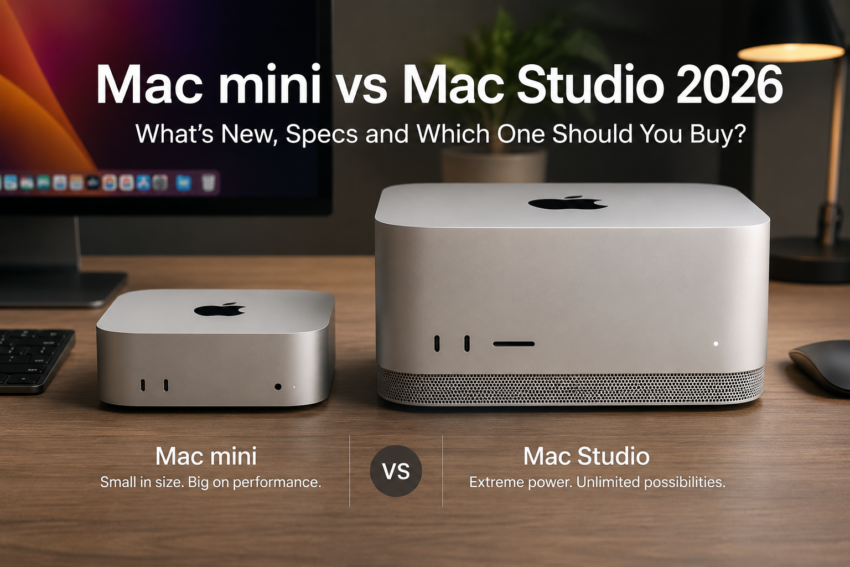
Apple didn’t wait for its usual autumn event this year. On August 25, 2026, it announced refreshed versions of both desktop Macs in one go: the Apple Mac mini with a choice of the all-new M6 or the M5 Pro chip, and the Apple Mac Studio moving to M5 Max and an entirely new M5 Ultra. Pre-orders are open now in India, with retail availability from September 22, 2026.
The timing and framing both point the same way: Apple is positioning these machines around running AI locally rather than through a browser tab. Both desktops get Neural Accelerators built into every GPU core, faster unified memory, and Apple’s new N1 wireless chip with Wi-Fi 7 and Bluetooth 6. But the two machines are aimed at very different buyers and very different budgets, and picking between them comes down to what you actually do with a computer, not which one has the bigger number on the spec sheet.
Apple Mac mini 2026: What’s New?
The Mac mini’s M6 chip is Apple’s first built on a 2-nanometre process, with a 12-core CPU (2 super cores, 4 performance cores and 6 efficiency cores), a 12-core GPU with hardware-accelerated ray tracing, and — for the first time on this machine, a Dual 16-core Neural Engine. Unified memory starts at 16GB and tops out at 32GB, with bandwidth up to 170GB/s. Storage runs from 256GB to 2TB.
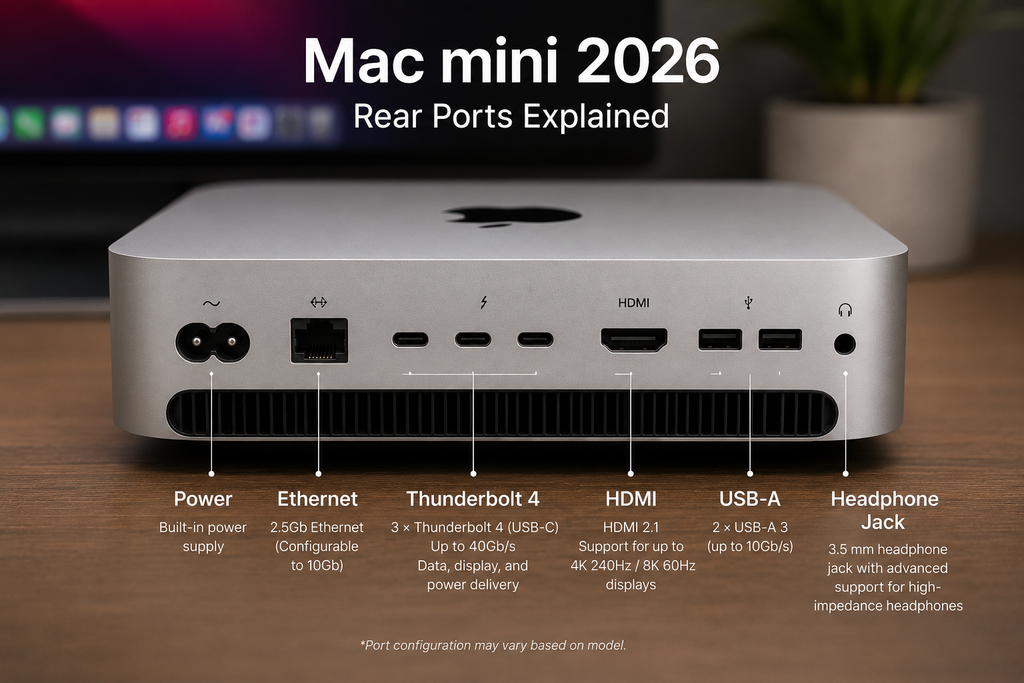
Step up to M5 Pro and the CPU grows to 15 or 18 cores, paired with a 16- or 20-core GPU, up to 64GB of unified memory and 307GB/s of bandwidth. The M5 Pro model also swaps the M6’s three Thunderbolt 4 ports for three Thunderbolt 5 ports (up to 120Gbps), which matters if you ever plan to cluster multiple Mac mini units to run larger local AI models, something only the M5 Pro version supports. Both chips support up to three external displays, and connectivity across the board now includes Wi-Fi 7, Bluetooth 6, and 2.5Gb Ethernet, configurable to 10Gb.
In India, the M6 Mac mini starts at ₹99,900 (16GB/256GB). The M5 Pro starts at ₹2,09,900 for the 15-core/16-core configuration and ₹2,33,900 for the full 18-core/20-core version.
Mac mini Performance: Who Is It For?
For students and everyday productivity- documents, browser tabs, video calls, Microsoft 365, or Google Workspace- the base M6 model is comfortably more machine than most people need, and its Neural Accelerators speed up things like AI-assisted photo edits without any extra cost to battery life, since it’s plugged in anyway.
Developers and programmers benefit from the M6’s single-threaded speed for everyday coding, while the M5 Pro’s extra memory and bandwidth suit larger builds, multiple simulators, or running on-device models through Xcode. Content creators doing moderate photo or video editing, not full 8K timelines, will find the M6 handles Photoshop and Lightroom-style workloads well, while video editors and 3D hobbyists get real headroom from the M5 Pro’s larger GPU. Small businesses and AI enthusiasts experimenting with local chatbots or image generation tools will likely want the M5 Pro specifically for its higher memory ceiling.
If you’d rather have a laptop than a desktop for any of this, our guide to best budget laptops in India covers strong Windows alternatives across every price band below the Mac mini’s entry point.
Apple Mac Studio 2026: What’s New?
Mac Studio now ships with M5 Max or the all-new M5 Ultra, replacing the previous generation’s mismatched M4 Max/M3 Ultra pairing. M5 Max carries an 18-core CPU, up to a 40-core GPU, up to 128GB of unified memory, and up to 614GB/s of bandwidth. M5 Ultra is Apple’s first quad-die chip, built by joining two M5 Max dies through UltraFusion: up to a 36-core CPU, an 80-core GPU, and a striking 512GB of unified memory at 1.2TB/s of bandwidth.
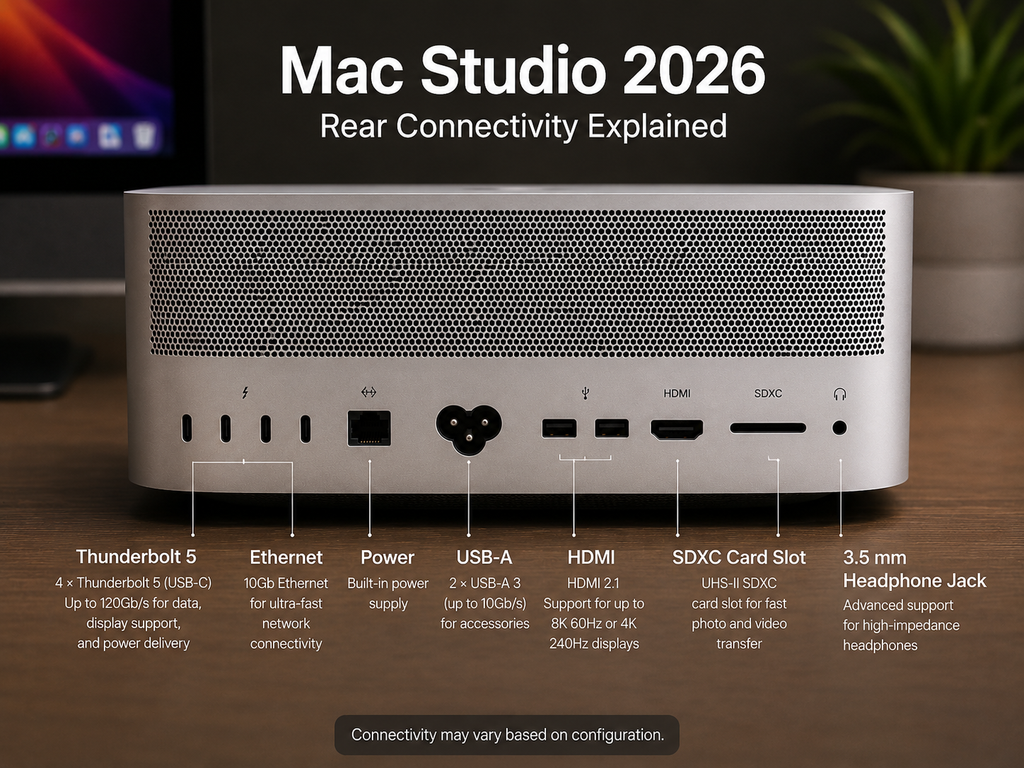
Both chips get third-generation hardware ray tracing, Neural Accelerators in every GPU core, and PCIe Gen 6 storage that Apple says is roughly twice as fast as before. Mac Studio now supports up to eight displays, adds genlock over USB-C for professional camera synchronisation, and gets Thunderbolt 5 across the board.
In India, the M5 Max Mac Studio starts at ₹2,79,900 (36GB/512GB). The M5 Ultra starts at ₹6,29,900 (96GB/1TB), and a fully configured 512GB unit runs to roughly ₹21,65,900, with that top memory configuration arriving in late October rather than at initial launch.
Mac Studio Performance and AI
This is where the Mac Studio earns its price gap over the Mac mini. Apple says the M5 Ultra delivers up to 4.3x faster peak AI performance than the outgoing M3 Ultra, alongside up to 1.8x faster graphics and 1.3x faster multithreaded CPU work — Apple’s own figures, not independent benchmarks. For 8K colour grading, uncompressed RAW photography at volume, 3D rendering, motion graphics and dense engineering datasets, the combination of GPU core count and memory bandwidth genuinely changes what’s possible without cloud compute.
Large local language models are the headline use case: 512GB of unified memory can hold model weights that would otherwise need a data-centre GPU cluster. But it’s worth being precise about what “large memory” actually buys you. Memory capacity determines whether a model fits on the machine at all; it doesn’t automatically make every model run fast, since that also depends on memory bandwidth, GPU compute throughput, and how well a given AI framework is optimised for Apple Silicon. A 512GB Mac Studio won’t make a poorly optimised model faster; it just makes it possible to load in the first place.
For comparison, on the Windows side, our AI Laptop vs Normal Laptop guide covers how NPU-based on-device AI works differently from Apple’s Neural Engine and GPU-based approach — useful context if you’re deciding between ecosystems rather than just models within one.
Mac mini vs Mac Studio: Direct Comparison
| Feature | Mac mini | Mac Studio |
| Chip options | M6 or M5 Pro | M5 Max or M5 Ultra |
| CPU cores | Up to 18 | Up to 36 |
| GPU cores | Up to 20 | Up to 80 |
| Unified memory | Up to 64GB | Up to 512GB |
| Memory bandwidth | Up to 307GB/s | Up to 1.2TB/s |
| Connectivity | Thunderbolt 4 (M6) or 5 (M5 Pro), Wi-Fi 7, BT 6 | Thunderbolt 5, Wi-Fi 7, BT 6, genlock |
| Display support | Up to 3 external displays | Up to 8 external displays |
| India starting price | ₹99,900 | ₹2,79,900 |
| Best for | Everyday productivity, development, moderate creative work | Professional creative, AI research, workstation workloads |
Which Mac Should You Buy?
The Mac mini is the sensible choice if you’re doing productivity work, programming, running a home office, studying, or handling moderate photo and video editing — and especially if you already own a monitor, keyboard, and mouse, since the mini’s price advantage partly comes from not bundling a display.
The Mac Studio makes sense once your work genuinely needs it: professional video editing at 8K, advanced 3D rendering and motion graphics, large local AI models, big software builds, engineering simulations, or multi-display professional setups. Buying a Mac Studio for browsing and email is buying headroom you’ll never use.
Neither machine is objectively “better” — the right one depends entirely on what sits between you and your work getting done.
Is Mac Studio Worth Paying More For?
The jump from a base Mac mini to a base Mac Studio is roughly ₹1,80,000 — and to the M5 Ultra, closer to ₹5,30,000. That premium only pays for itself if you can actually use the additional GPU cores, memory capacity, and bandwidth on a regular basis. For everyday productivity, the Mac mini’s performance-per-rupee is hard to beat.
It’s a useful comparison point that on the Windows side, genuinely capable on-device AI hardware — Copilot+ certified laptops — mostly starts around ₹80,000, as covered in our Best AI Laptops in India guide. Apple’s own Neural Engine has been part of every Mac since the M1, so a base M6 Mac mini already gives you competent on-device AI without needing to spend Mac Studio money to get it. The Studio’s real advantage is scale, running much larger models locally — not access to on-device AI itself.
Apple’s Claims vs Independent Testing
Every performance figure in this article — the 4x AI claims, the 1.8x graphics gains, the 40% faster CPU numbers — comes from Apple’s own internal testing, disclosed in its official announcement and footnoted against specific configurations. That’s worth being upfront about, because Apple’s comparisons are run on its own hardware, under conditions it chooses, and typically represent best-case scenarios for a specific app or benchmark.
Independent, third-party benchmarks aren’t available yet, since review units won’t ship until closer to the September 22 retail date. Early coverage from outlets like MacRumors, 9to5Mac, and Macworld so far reports on Apple’s disclosed specifications and claims rather than hands-on results. Once independent testing appears, it typically lands somewhere below Apple’s headline percentages in real-world, mixed workloads — a pattern worth remembering before treating any single-vendor number as a guarantee.
Alternatives Worth Considering
A Windows desktop remains the more flexible and typically cheaper option if you need broad game compatibility or specific Windows-only software. A Windows laptop makes more sense than either Mac here if portability matters more than raw desktop performance; our budget laptop guide linked above covers strong options across every price band.
If you want the Mac ecosystem but need to travel with your machine, a MacBook is the more sensible pick over a desktop; our MacBook comparison guide breaks down which model fits which kind of work. And if your current Mac is only a generation or two old, this update alone isn’t a strong enough reason to upgrade; the base M6 Mac mini is a genuinely new entry point, but existing M4-generation owners doing ordinary work won’t feel left behind for a while yet.
Final Verdict
The Mac mini gets a real architectural upgrade with M6, Apple’s first 2nm chip, plus a higher-end M5 Pro option with more memory and Thunderbolt 5 clustering support. The Mac Studio’s headline change is the M5 Ultra, a genuinely new quad-die chip built for local AI and professional workloads at a scale the Mac mini was never meant to reach.
Buy the Mac mini if you want a capable, efficient desktop for everyday work, development, or moderate creative tasks. Buy the Mac Studio only if your workload — not your curiosity- actually demands its GPU cores, memory capacity, or display support. Existing Mac owners on anything from the last two to three years generally don’t need to rush this upgrade unless a specific, recurring task is genuinely bottlenecked by their current machine. Choose based on what you’ll actually do with the computer, not which spec sheet looks more impressive.

Harry S is a digital marketing expert with 19+ years of experience. He created Reviews-4u.com to share simple, research-backed product insights that help users make better buying decisions.