
Affiliate disclosure: Reviews-4U may earn a commission if you subscribe through some of the links below. This does not affect our recommendations; we’d rather point you toward the free plan than a paid one you don’t need.
Pricing checked: September 2026. AI subscription prices and promotions change often; we recheck this article periodically, but always confirm current pricing on the provider’s own page before subscribing.
You probably already have ChatGPT, Gemini, and Claude open in free tabs right now. Every few weeks, one nudges you toward a paid plan: more messages, a smarter model, a bigger file upload. The free versions still handle most of what you actually use them for. So why does the upgrade prompt keep showing up — and is it worth tapping?
That’s the question this guide answers: not which AI is “best” in the abstract, but whether paying changes anything for you, and if so, which subscription is worth the money.
Do You Actually Need a Paid AI Subscription?
Probably not, if you’re an occasional user. Free versions of ChatGPT, Gemini, and Claude can already draft emails, summarise articles, answer general questions, and handle basic writing and editing. For someone who opens an AI assistant a few times a week, a paid plan often adds capability that just sits unused.
Paying starts to make sense when a specific limitation gets in your way repeatedly a message cap, a document too long to analyse, or a weaker model than the task needs. Heavy daily users can genuinely save hours a week with higher limits and better models. Occasional users mostly can’t.
A simple rule to apply before subscribing to anything: pay for productivity, not for the badge of having a premium AI account. If you can’t point to a specific task the free plan struggles with, there’s no rush.
ChatGPT vs Gemini vs Claude: What Are You Actually Paying For?
ChatGPT (OpenAI), Gemini (Google), and Claude (Anthropic) are the three most widely used general-purpose AI assistants. All three offer a usable free tier and one or more paid tiers on top.
Broadly, paid plans across all three can add more capable models, higher usage limits, larger file uploads, more image generation, deeper research features, coding assistance, and integrations with tools you already use (Gmail, Docs, Microsoft 365). How generous each limit is changes often; all three companies have adjusted pricing and included models more than once in the past year. Treat any specific limit here as accurate at the time of writing, not fixed.
One practical Indian detail: ChatGPT and Gemini now bill in rupees with UPI support. Claude’s India pricing is also in rupees, but currently card-only, no UPI.
What this comparison is based on: published provider documentation and pricing pages, cross-checked against dated Indian pricing reports, not independent lab-style benchmark testing of model quality.
Free vs Paid: What Do You Really Get?
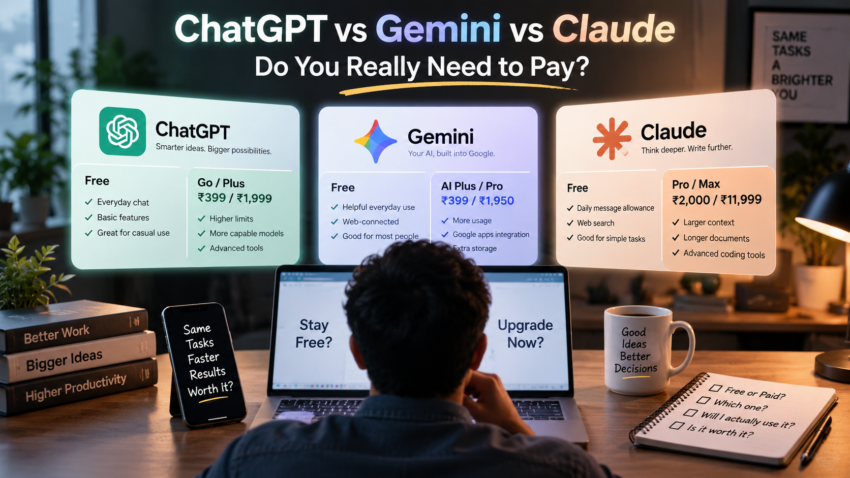
| ChatGPT | Gemini | Claude | |
| Free option | Unlimited basic chat; limited uploads/images/research | Generous daily use; web-grounded answers | Daily message allowance; web search included |
| Paid option | Go ~₹399, Plus ₹1,999, Pro ₹10,000+/mo | AI Plus ~₹399, AI Pro ~₹1,950/mo, AI Ultra premium | Pro ₹2,000–₹2,399, Max from ₹11,999/mo |
| Main reason to upgrade | Higher limits, latest reasoning models | Bundled Google One storage, higher limits | Longer documents, steadier writing, coding |
| Best suited for | All-round daily users, researchers, coders | Google/Workspace users, budget students | Writers, developers, long documents |
| Major paid advantages | Deep Research, image generation, custom GPTs | 2TB+ storage, Gmail/Docs integration, video tools | Large context window, Projects, Claude Code |
| Who probably doesn’t need to pay | Casual chatters, simple Q&A users | Anyone happy with free Gemini in Search/Gmail | Light writers who rarely hit the free cap |
Treat this as a starting point, not gospel — limits and models shift often enough that it’s worth checking each provider’s pricing page before subscribing.
ChatGPT Go vs Gemini AI Plus: The ₹399 Battle
This is the one genuinely close call in Indian AI pricing right now: ChatGPT Go and Gemini AI Plus sit at the same ~₹399/month, but they’re not really competing for the same reason to subscribe.
| ChatGPT Go | Gemini AI Plus | |
| Price | ~₹399/mo | ~₹399/mo |
| Gmail/Docs/Drive perks | No | Yes |
| Bundled storage | No | Yes (200GB) |
| Higher message/upload limits | Yes | Yes |
| UPI payment | Yes | Yes |
| Best pick if… | You want a general-purpose upgrade, no Google lock-in | You already live in Gmail/Docs and want storage bundled in |
Neither is objectively “better.” Go is the more general upgrade over Free; AI Plus is the better deal specifically for people already inside Google’s ecosystem.
ChatGPT — Is the Paid Plan Worth It?
Free users get unlimited basic text conversations, plus limited file uploads, image generation, voice, and deep research enough for everyday questions and general research.
Paid users (Plus, roughly ₹1,999/month) get more advanced reasoning models, higher upload and image limits, expanded Deep Research, custom GPTs, and faster responses at busy times. ChatGPT Go, around ₹399/month, sits between Free and Plus with higher limits but fewer advanced features, and can include ads. Pro, roughly ₹19,900/month, is a specialist tier for daily power users, not a default upgrade.
ChatGPT is worth paying for if…
- You regularly hit free message or upload limits
- You rely on Deep Research or document analysis for work
- You want a broad plugin and app ecosystem
- Image generation limits are a real bottleneck for you
Stay with the free version if…
- You mainly ask occasional questions or need quick drafts
- You rarely touch uploads, image generation, or deep research
- Budget matters more than marginal speed gains
Google Gemini Is the Paid Plan Worth It?
Free users already have solid access to Gemini through the standalone app and inside Search, Gmail, and Docs, with generous everyday limits and web-grounded answers.
Paid users on AI Plus (~₹399/month) or AI Pro (~₹1,950/month) get higher usage limits, deeper NotebookLM research, video generation tools, and bundled Google One storage (200GB on Plus, 2TB on Pro) across Photos, Drive, and Gmail. A premium AI Ultra tier sits above Pro for heavy creators; check Google’s current listing before assuming a price, since it’s been restructured more than once in 2026.
The real value driver isn’t the chatbot alone; it’s how much of your day runs through Gmail, Docs, and Drive. If it doesn’t, some of that bundled value goes unused.
Gemini is worth paying for if…
- You’re already deep in Gmail, Docs, Sheets, or Drive daily
- You need extra cloud storage anyway and want AI bundled in
- You want video generation tools alongside your assistant
- You use NotebookLM heavily for research or study
Stay with the free version if…
- You don’t use Google Workspace apps for serious work
- Your storage needs are already met elsewhere
- You use Gemini only occasionally via Search or Gmail
Claude — Is the Paid Plan Worth It?
Free users get a genuine daily allowance of messages with web search included — enough for regular writing help, quick research, and everyday questions without constantly hitting a wall.
Paid users on Claude Pro (₹2,000/month annually, ₹2,399/month monthly) get substantially higher usage limits, more capable models, a much larger context window for long documents, Projects, Research features, and Claude Code for developers. Claude Max, from roughly ₹11,999/month, multiplies those limits for people running Claude continuously through the day. Claude is widely regarded — by users and reviewers, not through independent testing here — for steady long-form writing and handling lengthy documents in one pass.
Claude is worth paying for if…
- You regularly work with long documents, contracts or manuscripts
- You’re a developer using Claude Code for real projects
- You write long-form content professionally and value consistency
- You need a large context window to keep an entire project in one conversation
Stay with the free version if…
- Your usage is occasional writing help or short Q&A
- You don’t need to feed in long documents regularly
- You’re not using coding or Projects features
Which AI Is Best for Different Users?
| User | Best Choice | Why | Would we pay? |
| Casual user | Any free plan | All three free tiers comfortably cover occasional use | No |
| Student | ChatGPT or Gemini (free), Claude for long essays | Budget-friendly free tiers cover most coursework | Only if limits bite |
| Writer | Claude Pro | Steadier long-form output, strong document handling | Yes |
| Researcher | ChatGPT Plus or Gemini Pro | Deep Research features, web grounding | Yes |
| Developer | Claude Pro/Max or ChatGPT Plus | Claude Code vs Codex — depends on your existing workflow | Yes |
| Content creator | Gemini AI Plus/Pro | Video generation tools bundled with storage | Probably |
| Freelancer | ChatGPT Plus | Broadest all-round toolkit for varied client work | Probably |
| Small business owner | Gemini (if on Workspace) or ChatGPT Team | Fits existing tools without adding new subscriptions | Depends on workflow |
| Heavy AI user | Whichever fits daily workflow, possibly two | Usage patterns matter more than brand loyalty | Yes, but only what earns its cost |
Sometimes the honest answer is “either works” — there’s no forced winner for every row above.
Which AI Subscription Gives the Best Value?
Value here isn’t just price — it’s price weighed against how often you’d use the extra capability and how much time it saves.
Light user: Uses AI occasionally for questions, rewriting or simple tasks. Probably stay free. None of the paid tiers pay for themselves at this usage level.
Regular user: Uses AI several times a week for work, study or content creation. A paid plan may be worthwhile, particularly if you’re consistently hitting free-tier limits or need one specific paid feature (Deep Research, longer documents, bundled storage).
Heavy user: Uses AI daily for research, documents, coding or business workflows. A paid subscription can provide meaningful value — the ₹1,999–2,399/month range is easy to justify if it reliably saves several hours of work monthly.
A quick way to test this yourself: divide the monthly cost by the hours it actually saves you. ₹1,999 ÷ 10 hours saved works out to about ₹200/hour — cheap next to most people’s hourly value. ₹1,999 ÷ 1 hour saved is a bad deal. The question isn’t “is AI expensive,” it’s “what’s my time worth, and is this plan actually saving me any?”
Does Paying for AI Give You Better Privacy?
Not automatically. A paid consumer plan usually means better usage limits and features — it does not by itself mean enterprise-grade data handling or a guarantee that your inputs are excluded from model training. If you’re uploading client documents, contracts, financial data, or unpublished work, check each provider’s current data-usage settings and opt-outs rather than assuming a paid badge covers you.
Do You Need More Than One AI Subscription?
For most people, no. ChatGPT, Gemini, and Claude overlap heavily on core chat, writing, and research capability, so paying for all three often means paying twice for the same task. Running ₹2,000–₹6,000/month combined is hard to justify unless each one solves a genuinely different problem.
Multiple subscriptions can make sense in specific cases, such as a developer using Claude Code alongside ChatGPT’s app ecosystem, or a Workspace business that also wants ChatGPT’s Deep Research. The sensible default: start with one subscription matching your main workflow, and add a second only when you can name the exact task the first can’t handle.
What About Free AI Alternatives?
You don’t have to subscribe to anything immediately. All three companies’ free tiers are more capable than they were a year ago, and using AI through the browser doesn’t need special hardware. An AI-branded “Copilot+” laptop makes no difference to how ChatGPT, Gemini, or Claude perform, since the processing happens on the provider’s servers either way. Use the free version first, and upgrade only once you hit a real, repeated limitation.
Common AI Subscription Mistakes to Avoid
- Paying because everyone else seems to be paying, not because of a real limitation
- Jumping straight to the most expensive tier instead of the cheapest one that fixes your actual problem
- Running two or three overlapping subscriptions that all do the same core task
- Forgetting a promotional price expires and auto-renews at the full rate
- Assuming “Pro” always means better answers dramatically, rather than mostly higher limits
The 5 Questions to Ask Before Paying for AI
- How often do I actually use AI daily, weekly, or occasionally?
- Am I regularly hitting free usage limits, or is this a one-off need?
- Will the paid features save me meaningful time, not just feel nice to have?
- Does this AI fit the apps and workflow I already use daily?
- Can I justify the subscription cost against my actual usage, not my ideal usage?
If a paid subscription connects to your email, documents, or calendar, it’s also a good moment to tighten the security on that account; see our passkeys vs passwords guide if you haven’t already.
Our Verdict: Do You Really Need to Pay for AI?
Most casual users genuinely don’t need a paid AI subscription in 2026. Free tiers of ChatGPT, Gemini, and Claude handle everyday questions, drafts, and quick research well enough. Regular users, several sessions a week for work or study, can benefit once a specific limitation shows up repeatedly. Heavy professional users, especially in research, writing, coding or content creation, often see real value once a subscription reliably saves hours each month.
There’s no single “best” AI assistant for everyone. ChatGPT is the broadest all-rounder, Gemini rewards people already living inside Google’s apps, and Claude stands out for long-form writing and document work. The right choice depends on your workflow, not what’s trending, and for most people, paying for all three at once is unnecessary.
Don’t subscribe because everyone else is using it. Subscribe when the AI saves you enough time, effort, or money to justify the cost.
Frequently Asked Questions
Is ChatGPT Plus worth paying for in 2026? If you regularly hit free message, upload or research limits, yes. Occasional use is usually fine on Free or the cheaper Go tier.
Is Gemini’s paid plan worth it? Most worthwhile if you already use Gmail, Docs or Drive daily, since the plan bundles Google One storage with higher Gemini limits.
Is Claude Pro worth paying for? Worth it for long documents, professional writing, or coding through Claude Code. The free plan well serves occasional users.
Which AI is best for students? Free tiers of ChatGPT and Gemini cover most coursework; Claude’s free plan handles long essay drafts well. Our Best AI Tools for Students guide breaks this down by task.
Do I need more than one AI subscription? Usually not. Start with the one matching your main workflow, and add a second only if it solves a task the first can’t.

Harry S is a digital marketing expert with 19+ years of experience. He created Reviews-4u.com to share simple, research-backed product insights that help users make better buying decisions.