
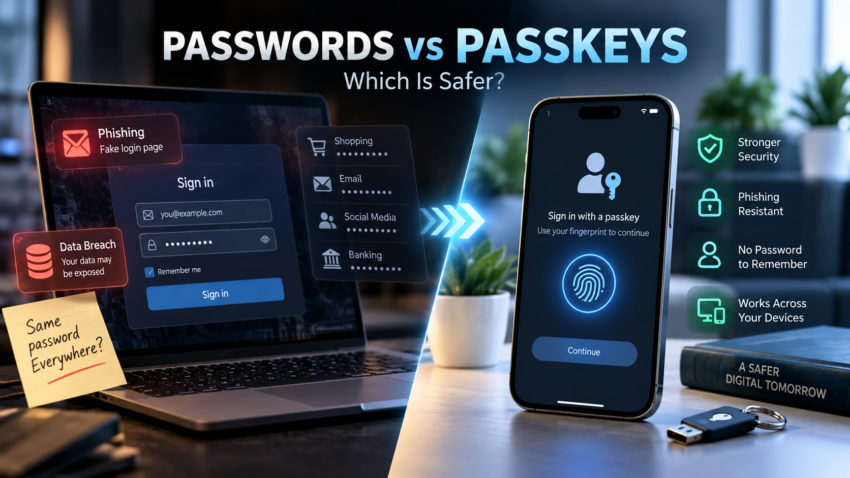
Most people juggle dozens of logins for banking, shopping, email, and social media, and reuse a familiar password across half of them because remembering unique ones is exhausting. That habit is exactly how one leaked password from a shopping site turns into a compromised bank account. Password reuse, convincing phishing pages, and data breaches exposing millions of email-password pairs at once have made “just pick a strong password” feel like incomplete advice.
Passkeys are the newer answer, built on login standards Apple, Google, and Microsoft have all adopted. The short answer: For most people, passkeys are safer than traditional passwords. They are designed to resist phishing and eliminate many of the risks associated with password reuse, credential theft and credential stuffing. However, passkeys aren’t available everywhere yet, so passwords and password managers still have a role to play.
Passkeys Are Already Going Mainstream
Passkeys are no longer just an emerging alternative to passwords. Adoption is growing rapidly across major technology platforms and online services. According to the FIDO Alliance’s 2026 research, there are now an estimated 5 billion passkeys in active use worldwide. The same research found that 90% of consumers are familiar with passkeys, while 75% have enabled a passkey on at least one account.
That growing adoption is important because passkeys are becoming easier to use across smartphones, computers, browsers, password managers, and major online services. Apple, Google, and Microsoft all support passkey authentication, while an increasing number of websites and apps are adding support.
For everyday users, this means passkeys are no longer something to simply watch from the sidelines. If a trusted service offers a passkey option, it is increasingly worth considering as a safer alternative to signing in with a traditional password.
What Is a Password?
A password is a secret string of characters you create and type in to prove it’s you. When you log in, the service checks what you typed against what it stored, usually a scrambled (hashed) version, so even the company itself isn’t supposed to read it directly.
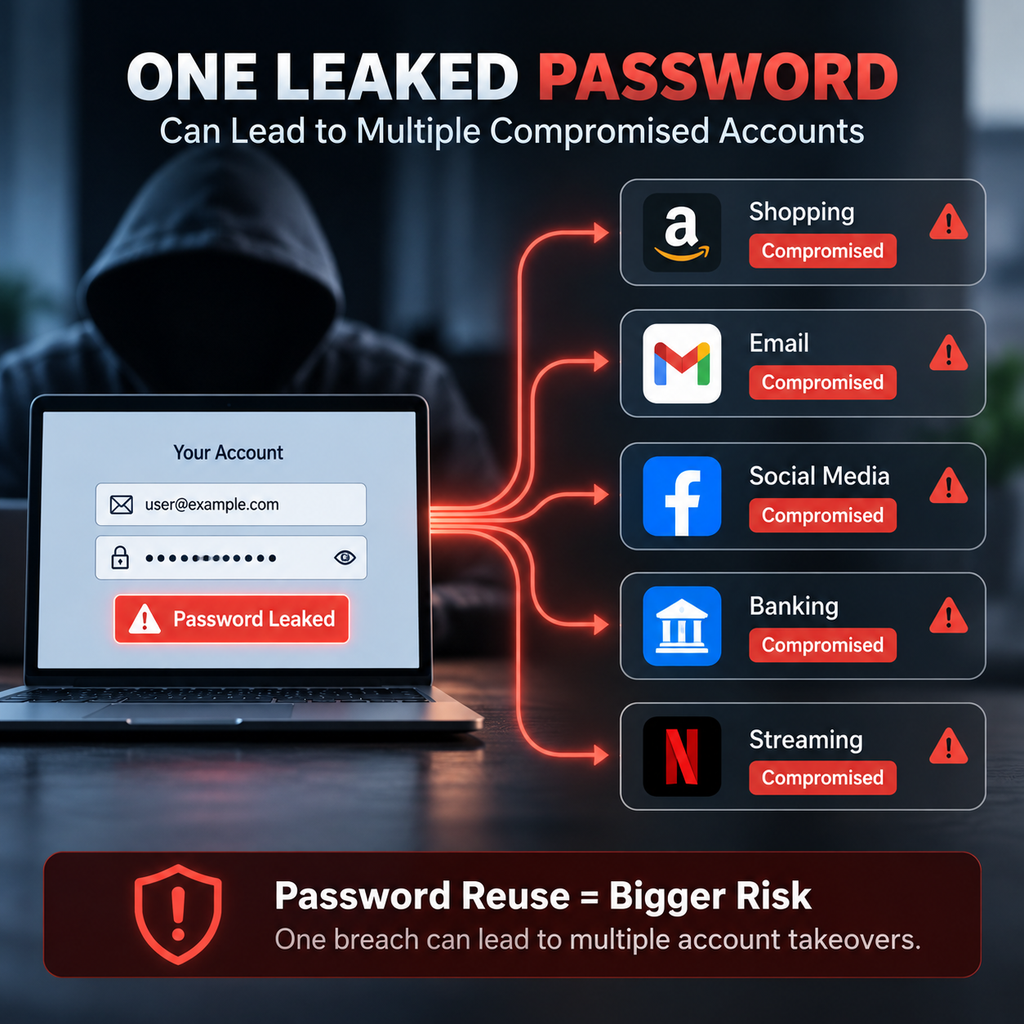
That system works, but depends entirely on human behaviour. Weak passwords (“password123”, a pet’s name, a birth year) get guessed by automated tools in seconds. Reusing one password across accounts means a breach at one company puts every other account at risk, a technique called credential stuffing. Phishing exploits the fact that a password is just typed text: trick someone into typing it into a fake site, and it works exactly the same for the attacker as it does for them. Our guide to protecting your personal data online covers this alongside 2FA and everyday scam habits.
What Is a Passkey?
A passkey is not simply a password stored on your phone. It’s built on public-key cryptography: your device generates two mathematically linked keys, a private key and a public key, the moment you set up an account.
The public key gets stored with the service, your bank, your email provider, a shopping site. The private key never leaves your device; it stays inside your phone’s or computer’s secure hardware, never shared with the service, even during login. Because the two keys are mathematically paired, the service confirms it’s you without ever holding anything an attacker could steal and reuse.
Unlocking that private key is where a fingerprint, Face ID, or PIN comes in, but it’s worth being precise: your biometric data authenticates you to your own device only. It is not sent to the website as your passkey, and the website never receives it.
Passkeys are no longer an emerging experiment. FIDO Alliance research published in 2026 estimates that 5 billion passkeys are now in active use worldwide. Its consumer research also found that 90% of consumers are familiar with passkeys and 75% have enabled a passkey on at least one account.
How Do Passkeys Work?
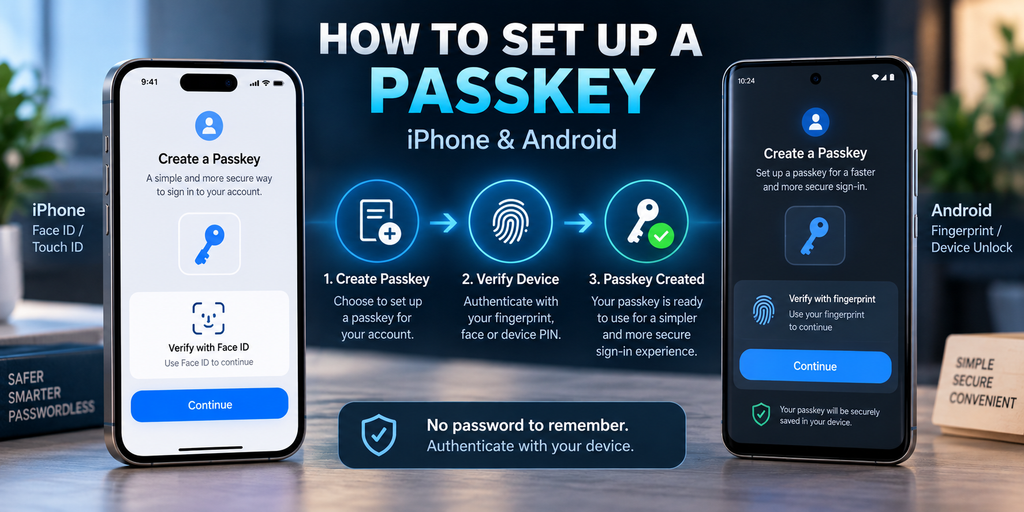
Setting up and using a passkey generally follows this sequence:
- You choose to create a passkey for an account, your email, bank, or a shopping app.
- Your device generates a unique cryptographic key pair for that account.
- Depending on the implementation, a passkey may be securely synchronized across your devices through a credential manager, or remain bound to a specific device or security key.
- The service keeps only the public key.
- When you sign back in, your device unlocks the private key using fingerprint, face scan, or PIN.
- Your device answers a cryptographic “challenge” using the private key, proving you hold it without ever transmitting it.
Think of the public key as a padlock the service keeps, and the private key as the only key that opens it. You never hand the key over; you prove you’re holding it, and only your unlocked device can make that proof.
Passkeys vs Passwords: Key Differences
| Factor | Passwords | Passkeys |
| User has to remember credentials | Yes | Generally no |
| Phishing resistance | Lower | Much higher |
| Credential reuse risk | Yes | Significantly reduced |
| Brute-force risk | Applicable | Different security model |
| Credential theft | Possible | Private key is designed not to be shared |
| Device dependency | Lower | Higher |
| Ease of use | Familiar | Increasingly simple |
| Recovery considerations | Password reset | Account/device recovery |
| Cross-device use | Easy if password is known | Supported through modern credential ecosystems |
| Security potential | Depends heavily on user behaviour | Generally stronger |
Passkeys shift risk away from things you can forget or leak, toward how well you protect the device and account that holds them. That’s a trade-off, not a guarantee.
Are Passkeys Safer Than Passwords?
For most users and supported services, passkeys provide a stronger security model than traditional passwords.
There’s no password for an attacker to phish, guess, or find in a leaked database, because there’s no shared secret sitting on a server waiting to be stolen. Each passkey is bound to the specific website it was created for, so it won’t work on a convincing fake copy, something a typed password can’t distinguish. Because a fresh passkey is generated per service, a breach at one company can’t unlock your accounts elsewhere.
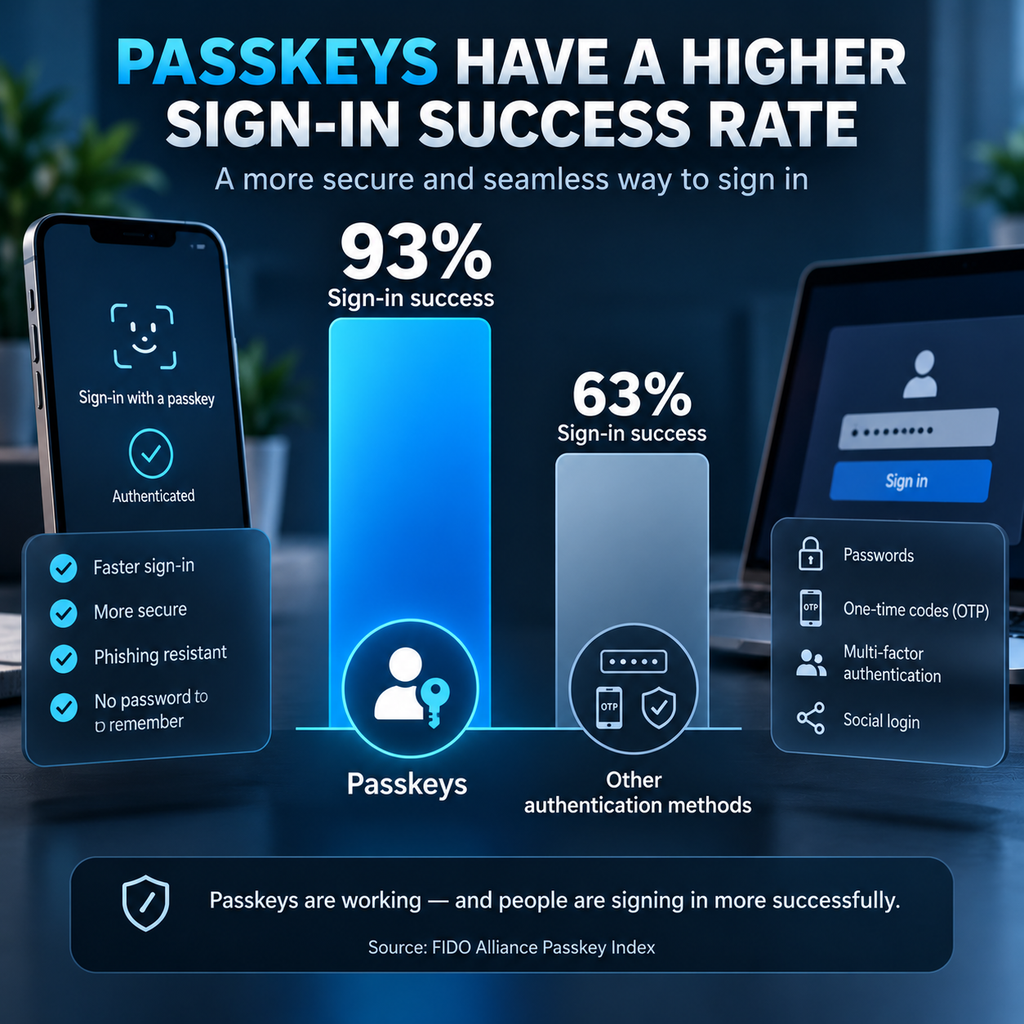
Adoption data backs this up: FIDO Alliance research found a 93% success rate for passkey sign-ins, compared with 63% for other authentication methods such as OTP, MFA and social login.
None of this removes every risk. It means the attacks behind most password breaches, phishing and credential reuse, become far harder to pull off.
Why Are Passkeys More Resistant to Phishing?
A password is portable in the worst possible way: if you can be tricked into typing it anywhere, it works there. A passkey is different because it’s cryptographically bound to the exact domain it was created for.
Picture a fake banking login page that looks pixel-perfect, right down to the logo. With a password, you might type real credentials straight into it without noticing. With a passkey, your device checks the website’s actual domain before offering to authenticate. If the domain doesn’t match, your device won’t offer it, so there’s no credential to intercept, whether or not you spotted the fake site.
Are Passkeys Completely Secure?
No authentication method is completely risk-free, and passkeys are no exception. What changes is which categories of attack matter most: a lost or stolen device without a strong screen lock; a compromised Apple, Google, or Microsoft account that syncs your passkeys, since that account becomes a single point of failure; social engineering; device-level malware; and weak account-recovery processes an attacker exploits instead.
Passkeys are phishing-resistant, not un-hackable. “Phishing-resistant” and “100% secure” are different claims.
Passkeys vs Password Managers
These solve related but different problems. A password manager stores and auto-fills existing passwords behind one master password, and stays useful because most websites still rely on passwords. A passkey replaces the password entirely for a specific account, using device-based cryptographic authentication instead of anything you type.
Many people will use both for years. Managers like Bitwarden, 1Password, and Google Password Manager now also store and sync passkeys, so switching some accounts to passkeys just means fewer accounts inside your manager still needing a typed password.
Passkeys on iPhone, Android and Windows
Apple, Google, and Microsoft all support passkeys natively, though details differ.
On iPhone and iPad, passkeys are stored in iCloud Keychain, unlocked with Face ID, Touch ID, or your passcode, and synced across Apple devices. Weighing an iPhone against Samsung’s current flagship? Our iPhone 17 Pro Max vs Samsung Galaxy S26 Ultra comparison covers how the two ecosystems differ more broadly.
On Android, passkeys typically sync through Google Password Manager, unlocked with fingerprint, face unlock, or screen lock, and travel across Android phones on the same Google Account. Samsung devices add Knox security on top; see our Samsung Galaxy S26 series review for how that layers in.
On Windows, Windows Hello handles the unlock step (face, fingerprint, or PIN), and passkeys can also live inside a third-party password manager instead of one device.
Cross-device sign-in is supported too: a phone holding a saved passkey can often authenticate a nearby laptop via QR code, even without storing the passkey there.
Passkey adoption is also expanding across India’s digital ecosystem, although availability varies significantly between banks, apps and services. Check the security settings of your individual provider to see whether passkeys are supported.
What Happens If You Lose Your Phone?
Losing your phone doesn’t automatically mean losing every passkey on it. Because passkeys created through iCloud Keychain or Google Password Manager sync to your account rather than living only on that device, setting up a new phone and signing back in typically restores access. Replacing a lost phone with a refurbished, used, or open-box device doesn’t change this: account recovery matters more than the replacement’s condition.
That said, recovery depends heavily on the strength of your underlying account recovery setup, not the passkey itself. A weak recovery email, no backup 2FA method, or an outdated phone number can turn a lost device into a genuinely difficult recovery process. Recovery methods vary by service, so check your provider’s process rather than assuming one universal approach applies.
Practical steps before you ever lose a phone: keep account recovery details current, enable a second recovery method where offered, and know your provider’s device-loss process in advance.
Should You Switch From Passwords to Passkeys?
Most everyday users: turn on passkeys wherever a trusted service supports them, banking apps, email, and major shopping or social platforms are a sensible place to start.
People managing many accounts: use passkeys where available and keep a password manager for accounts that haven’t added support yet, rather than forcing one system everywhere.
High-value accounts (primary email, banking, UPI apps): prioritise strong account-recovery settings as much as the login method, since recovery is often the weaker link.
Older devices or services without passkey support: keep using long, unique passwords through a password manager. If a hardware upgrade is on the cards anyway, see whether it’s worth upgrading your smartphone every year; most current mid-range phones already support passkeys, including several in our Best Smartphones Under ₹50,000 in India roundup.
Advantages and Disadvantages of Passkeys
Advantages:
- Strong resistance to phishing, since credentials are domain-bound
- Nothing to remember or type
- No reused passwords across accounts to leak in a breach
- Faster sign-in on supported devices
- Cryptographic authentication rather than a shared secret
- Convenient device or biometric unlock
Disadvantages:
- Not every website or app supports them yet
- Recovery after losing a device can be confusing without preparation
- Greater reliance on your device and cloud account ecosystem
- Many users don’t fully understand how passkeys sync or where they’re stored
- Account recovery security still matters as much as ever
Passkeys vs Passwords: Which Should You Choose?
Choose passkeys whenever a trusted service supports them, while keeping a secure password manager for accounts that still rely on passwords. This hybrid approach reflects where adoption stands: major platforms support passkeys today, but plenty of smaller sites and older systems don’t yet.
Forcing every account onto one method right now means leaving some accounts less protected, or fighting services that haven’t caught up. The practical path is enabling passkeys as they become available and letting a password manager handle the rest.
Frequently Asked Questions
Are passkeys safer than passwords? For most supported services, yes. They remove phishing and credential-reuse risk, the two biggest causes of password breaches, though no method is fully risk-free.
Can passkeys be hacked? Not the way passwords are stolen or guessed. Risk shifts toward device theft, compromised cloud accounts, and weak recovery processes.
Can I use a passkey on multiple devices? Yes, via iCloud Keychain, Google Password Manager, or a passkey-enabled password manager, plus cross-device sign-in via QR code.
What happens if I lose my phone? Synced passkeys are usually recoverable on a new device, provided your account recovery options are set up properly.
Are passkeys better than password managers? Different problems. Passkeys replace passwords for supported accounts; password managers remain useful for accounts that still require one.
Do passkeys work on iPhone? Yes, through iCloud Keychain, unlocked with Face ID, Touch ID, or your passcode.
Do passkeys work on Android? Yes, typically through Google Password Manager, unlocked with fingerprint or face unlock.
Can I still use passwords after creating a passkey? Yes, most services keep a password as a fallback, at least for now.
Are passkeys completely phishing-proof? Highly resistant, not proof against everything; domain-binding stops classic phishing, but device compromise remains a separate risk.
Should I switch all my accounts to passkeys? Switch wherever a trusted service offers it; for accounts without support yet, a strong password through a password manager remains right.
Worth spending ten minutes reviewing your most important accounts, primary email, banking, UPI apps, first, and turning on a passkey wherever it’s offered.

Harry S is a digital marketing expert with 19+ years of experience. He created Reviews-4u.com to share simple, research-backed product insights that help users make better buying decisions.