
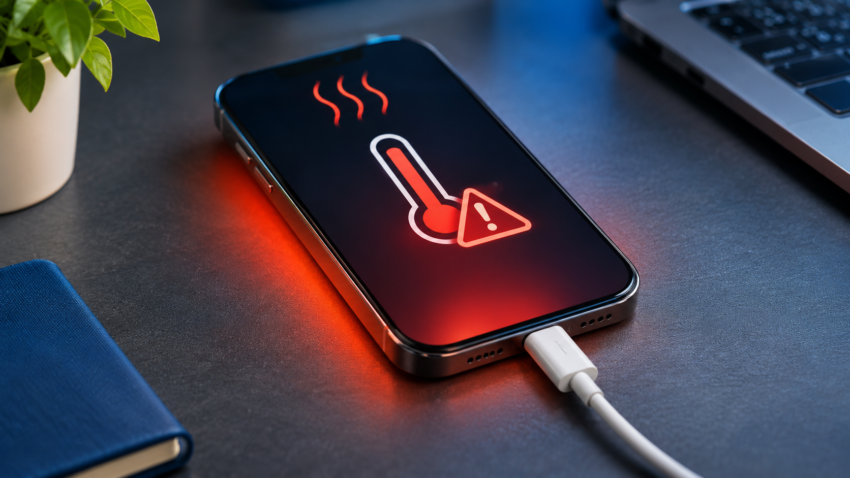
A warm phone is normal. A phone that is too hot to hold, dims its screen, or refuses to charge is not. So why is my phone overheating? Usually because the processor, battery, or charger is producing more heat than the phone can shed. Common triggers are a heavy game, fast charging, a hot environment, weak signal, a misbehaving app, or a software fault. Less often, the battery itself is wearing out.
This guide shows how to tell normal warmth from a real problem, what causes smartphone overheating, how to cool a hot phone safely, and when to book a repair. It draws on official support guidance from Apple, Samsung and Google. We have not measured surface temperatures ourselves.
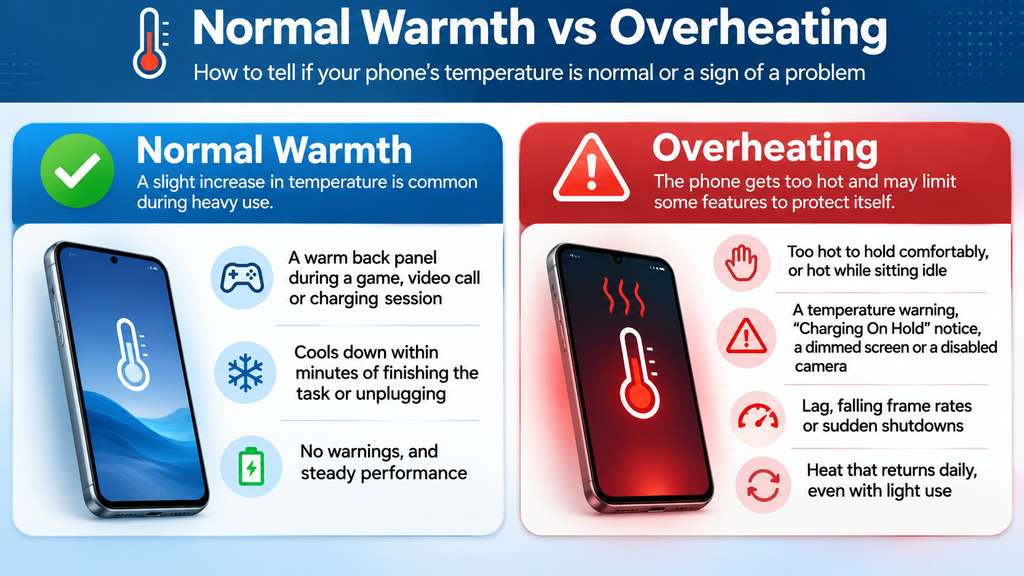
Normal Warmth vs Overheating
Apple, Samsung and Google all list gaming, video recording, streaming, navigation, new-phone setup, and backup restores as normal reasons for a warm phone. Apple and Samsung add wireless or fast charging.
Normal warmth looks like this:
- A warm back panel during a game, video call or charging session
- Cooling within minutes of finishing the task or unplugging
- No warnings, and steady performance
Overheating looks like this:
- Too hot to hold comfortably, or hot while sitting idle
- A temperature warning, a “Charging On Hold” notice, a dimmed screen or a disabled camera
- Lag, falling frame rates or sudden shutdowns
- Heat that returns daily, even with light use
A hot phone protects itself. Google says a Pixel may reduce CPU speed, slow charging, switch off the camera and flash, and cut mobile data or Wi-Fi before turning off. Apple describes similar behaviour on iPhone: slower charging, a dimmed display and weaker cellular signal. These are safety measures, not faults, but frequent appearances signal a problem.
Is There a Safe Temperature for a Phone?
No single number fits every smartphone, and a thermometer reading from the back panel is not a reliable guide. Apple publishes an ambient range, meaning the air around the phone: iPhone is designed for use between 0° and 35°C. Samsung and Google describe warning and throttling behaviour rather than one surface figure.
Judge by behaviour instead. Warm and stable is fine. Uncomfortable to hold, or paired with warnings, throttling or shutdowns, is not. Many Indian cities see summer afternoons above 35°C, so a phone used outdoors can sit outside Apple’s stated range before it does any work.
Smartphone Overheating Causes
Most heat comes from the processor, battery, or charger. Usual triggers:
- Intensive gaming: sustained graphics load keeps the chip near its limit. Even strong performers in our best smartphones under ₹50,000 in India roundup are noted for running warm in long sessions.
- Video recording and calls: camera, processor, screen, and mobile radio all run at once.
- Background apps and hotspot use: apps that sync, track location, or never sleep keep the processor busy. Tethering adds to it.
- Charging and fast charging: more power going in means more heat coming off.
- Poor network signal: Samsung lists weak signal as a cause, because the radio works harder to hold a connection.
- Sunlight, hot cars and thick cases: heat that cannot escape stays in the phone.
- Software bugs: a faulty app or update can keep the processor busy. Google has pushed fixes for Pixel overheating and battery-drain reports before.
- Battery wear or damage: an ageing or damaged cell generates more heat.
- Damaged accessories: frayed cables, incompatible chargers, and liquid or metal debris in the charging port can all cause heating.
Why Phones Overheat While Charging, Gaming and on Video Calls
Phone Overheating While Charging
Charging is never perfectly efficient. Energy that does not reach the battery becomes heat. Fast chargers push more power in, and Apple lists wireless charging among the normal causes of warmth. The heat stacks when you use the phone at the same time: Google specifically warns against running resource-heavy features while charging. Add a case, a pillow or a sunny windowsill and the heat has nowhere to go.
When a phone is too hot to charge, it reacts. An iPhone shows “Charging On Hold”, and Samsung and Pixel phones slow or pause charging. That is the system working as designed; fix the conditions rather than blame the phone.
Gaming and Video Calls
Games load the CPU and GPU, keep the screen bright and use the network at once. Video calls add the camera and microphone. A phone may feel smooth at first, then stutter as it throttles to protect itself.
Everyday Use
Heat during light use usually points to a stuck background app, a failed sync, a bad update, weak signal, or a hot room. On a brand-new phone, setup and restore tasks are the likely cause.
How to Reduce Phone Temperature Right Now
- Stop heavy use and unplug the charger.
- Move to shade or a cooler room and take off the case.
- Switch off hotspot, Bluetooth and GPS if you do not need them.
- Lower the screen brightness and let the phone rest.
- If an iPhone shows a temperature warning, turn it off and let it cool, as Apple advises.
Do not put a hot phone in a refrigerator or freezer, or press ice or cold packs against it. Rapid cooling can cause condensation inside the phone, and manufacturers advise moving it to a cooler place instead.
How to Stop Phone Overheating: Steps for Any Phone
- Update the system and apps. Updates often fix bugs that keep the processor busy.
- Find the app responsible. Open the battery usage screen in Settings and look for an app using far more than its share. Update, restrict or uninstall it. Closing every app by hand is rarely needed, because RAM exists to keep recent apps ready, as our guide on how much RAM a smartphone really needs explains.
- Restrict background activity. Limit background refresh and location access for apps that do not need them.
- Fix your charging habits. Use the charger and cable that came with the phone, or a good-quality certified one. Charge on a hard surface, not a bed or sofa. Do not game or record video while charging.
- Reduce the load. Lower brightness and game graphics settings, take breaks, and prefer Wi-Fi over weak mobile data, as Google suggests.
- Keep it out of heat. Never leave it in a parked car, as Apple warns, and avoid direct sun while navigating or filming.
- Restart the phone to clear stuck processes.
Android Phone Heating Problem: Extra Steps
- Pixel 6 and later: open Settings > Battery > Battery diagnostics > Phone is very warm for tailored suggestions.
- Samsung Galaxy: open Settings > Battery and device care (Device care on some versions) to see battery use and background activity. Samsung also suggests a Standard refresh rate on supported models, and its Members app can run diagnostics.
- Safe mode: if the phone stays cool in safe mode, a downloaded app is the likely cause. Uninstall recent installs one at a time (steps vary by brand).
- Charging port: use a torch to check for lint or debris, and never poke it with metal.
- Charge limit: many Galaxy phones offer “Protect battery”, which caps charging at 85% (options vary by One UI version). It slows battery wear but does not cool the phone.
iPhone Overheating Fix
- Battery usage: check Settings > Battery for apps using the most power, then switch off Background App Refresh for heavy ones under Settings > General.
- Low Power Mode: it reduces background activity while the phone cools.
- Setup, restore, and big updates: Apple lists these as normal; the warmth fades once they finish.
- Charge Limit (iPhone 15 and later): Settings > Battery > Charging lets you pick 80% to 100% in 5% steps. With Optimized Battery Charging, it reduces time at full charge but is a longevity tool, not a cooling fix.
- Repeated temperature warnings: contact Apple Support or an authorised service provider.
Can Overheating Damage Your Phone?
Battery first. Apple says very hot conditions can permanently shorten iPhone battery life, and heat is hard on lithium-ion batteries generally. An occasional warm game session does no lasting harm. Repeated overheating, a hot car dashboard or charging under a pillow adds up.
Processor and other parts. Throttling and automatic shutdowns exist to prevent damage. We found no manufacturer guidance saying routine throttling harms the processor. The realistic cost of regular overheating is lost performance and a shorter-lived battery. A damaged or swollen battery is different. It is a safety issue.
Warning Signs of a Battery Problem or Need for Repair
- Heat while idle, even after a restart and a software update
- Fast battery drain, jumping percentages or unexpected shutdowns
- A back panel or screen lifting at the edges, which can mean a swollen battery
- A charging port or cable that gets hot, or charging that keeps cutting out
- Frequent temperature warnings or “Charging On Hold” messages
- A burning smell, smoke or leaking liquid: stop using the phone, unplug it, move it away from anything flammable and get help immediately
If any of these appear, stop charging and visit an authorised service centre, the safer choice for battery work that also protects your warranty. Our guide on how to check a phone before buying shows where to read battery health on iPhone, Samsung and Pixel phones, plus a ten-minute video test. For used or refurbished phones, our explainer on refurbished vs used vs open-box devices covers the warranty to ask for. A battery replacement is usually cheaper than a new phone, a point we weigh in is it worth upgrading your smartphone every year.
Phone Overheating Causes, Symptoms and Fixes at a Glance
| Cause | Typical symptoms | Recommended fix |
| Heavy gaming | Hot back, falling frame rates, dimmed screen | Lower graphics settings, take breaks, remove case, avoid charging while playing |
| Fast or wireless charging | Warm while plugged in, slow charging, “Charging On Hold” | Charge in shade on a hard surface with the original charger; avoid heavy apps |
| Video calls, recording, streaming | Heat near camera, disabled camera or flash | Shorten sessions, lower brightness, use Wi-Fi |
| Background apps, hotspot | Warm while idle, fast drain | Check battery usage, update or restrict the app, switch off hotspot |
| Weak signal | Heat plus poor bars, fast drain | Use Wi-Fi, avoid long use in dead zones |
| Sun, hot cars, thick cases | Warning after outdoor use, dim screen | Move to shade, remove case, never leave in a parked car |
| Software bug or pending update | Heat started after an update or install | Update, restart, test in safe mode on Android |
| Worn or damaged battery | Heat with fast drain, shutdowns, swelling | Stop charging, get a battery check at a service centre |
| Damaged cable, charger or dirty port | Hot at the plug end, charging cuts out | Replace with a quality cable and charger, and clear debris carefully |
Frequently Asked Questions
Is it normal for my phone to get hot while charging?
Warm is normal, especially with fast or wireless charging. Too hot to hold, or repeated “Charging On Hold” pauses, is not. Unplug it and remove the case.
Why does my phone get hot when I am not using it?
Usually a background app, a stuck sync, weak signal or a software bug. Check battery usage, update, then restart. If heat persists with fast drain, get the battery tested.
How hot is too hot for a phone?
There is no universal figure. Apple’s published range is for the air around the iPhone, 0° to 35°C. Rely on behaviour: warnings, dimming, throttling, or shutdowns mean it is too hot.
Can I put my overheated phone in the fridge or freezer?
No. Rapid cooling can cause condensation inside the phone. Move it to shade or a cooler room, remove the case and let it cool on its own.
Does fast charging damage the battery?
Phones are built for it and slow charging when hot. But fast charging makes more heat, and heat wears batteries. Use the supplied charger, keep the phone cool and consider a charge limit.
Will a factory reset fix overheating?
Only if the cause is software. Try updates, a restart and Android safe mode first. Back up before any reset. It will not fix a worn battery or damaged hardware.
Why is my new phone hot on the first day?
Setup, restoring a backup and downloading apps are heavy tasks. Apple and Google list them as normal causes of warmth, and the heat should ease once they finish.
Conclusion
Most overheating comes down to heavy tasks, charging, heat and software. The most effective fixes: keep the phone out of the sun, remove the case, use the original charger, avoid gaming while charging, update the software and find any app using too much power.
Seek professional help if heat comes with fast battery drain, shutdowns, a swollen back or screen, a hot charging port, or repeated temperature warnings. A battery test at an authorised service centre will show whether it needs a new battery.

Harry S is a digital marketing expert with 19+ years of experience. He created Reviews-4u.com to share simple, research-backed product insights that help users make better buying decisions.